
Creator Workflow System for n8n
Move one content project from rough notes to a reviewed draft, distribution package, and permanent archive without rebuilding context at every step.
Ten modular n8n workflows share one persistent project record. Use local Ollama or the included OpenRouter path, keep quality gates visible, and stay in control before anything is published.
$39 for the first 50 purchases, then $59. One-time payment. Use local Ollama or your own OpenRouter account.
Content work gets messy between the idea and the publish button.
Research lives in one chat. Keyword notes sit somewhere else. The draft forgets the original goal, visual evidence gets added late, and social copy becomes another disconnected task.
The Creator Workflow System keeps the useful project context together while moving each job through a focused workflow you can inspect and modify.
The project stays connected from start to finish.
The project ID restores the saved record before every stage. A blocked request explains what is missing without wiping out completed work.
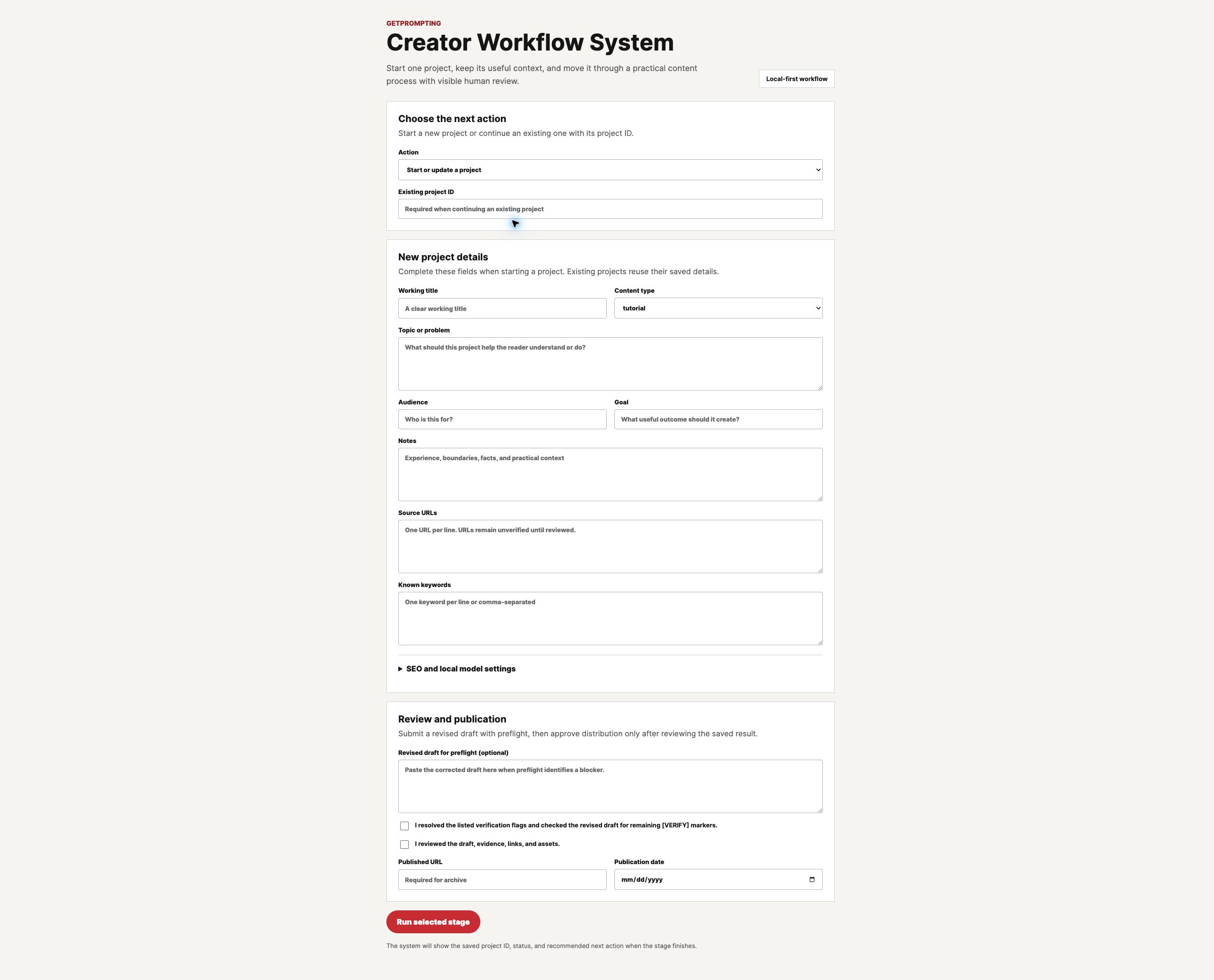
One practical starting point
Choose the next stage from the branded Command Center instead of opening and managing ten workflow tabs.

Guardrails you can understand
Premature distribution produces a readable explanation and confirms that the saved project was not overwritten.

Visible editorial readiness
Deterministic checks and the editor’s review must agree before the project can move into distribution.

Platform drafts without autoposting
Prepare useful starting copy for four channels while keeping the final edit and publishing decision in human hands.
Ten workflows, one connected content process.
One Command Center routes the process. Nine specialist workflows handle a single responsibility and update the same saved project.
Creator Command Center
Start a project, restore its saved context, choose the next stage, and manage the review loop from one place.
Project and Source Intake
Capture the audience, goal, notes, source URLs, and initial keyword direction once.
Research Organizer
Turn supplied notes and references into a useful brief while keeping unverified evidence visible.
SEO Research Accelerator
Use your own keywords for free or connect optional DataForSEO metrics when the decision needs them.
Content Strategy and Outline
Define search intent, the reader promise, a useful angle, the working title, and the article structure.
Draft Preparation
Create editable Markdown with verification flags, missing assets, and editor notes still visible.
Visual Asset Planner
Plan feature art, real interface screenshots, filenames, alt text, and supporting evidence.
Editorial Preflight
Check required fields, draft readiness, links, verification markers, visual evidence, and human review.
Distribution Packager
Prepare separate starting drafts for X, LinkedIn, Instagram, and newsletters after approval.
Archive and Performance Log
Preserve the final URL, publication date, keyword direction, distribution state, and project manifest.
See one project move through the complete system.
This walkthrough uses a verified project run. It shows the actual intake, research, SEO direction, strategy, draft, visual plan, blocked distribution test, correction loop, preflight checks, platform drafts, and final archive record.
The demonstration is intentionally transparent: the system prepares and checks content, but it does not browse sources or publish on your behalf.
Use local AI or choose an OpenRouter model.
The included workflows use Ollama as the local default and include a tested OpenRouter cloud path. Choose the provider and model in the Command Center while keeping the prompts, structured outputs, and human review gates intact.
Run with Ollama
Keep model calls on hardware you control. This path needs enough available memory and a JSON-capable instruction model.
-
qwen3:4bis the conservative 16 GB starting point - 8B models are better suited to 24 GB or more
- Speed and quality depend on your hardware and model
Connect OpenRouter
Assign your OpenRouter credential inside n8n, then choose a supported cloud model from the Command Center.
- No local model or dedicated GPU required
- Provider charges and terms remain separate
- Credentials stay inside n8n’s credential manager
Use the SEO path that fits your setup.
The core system does not force another subscription into your workflow.
Manual keyword mode
Enter the keywords you already know, collect from Search Console, or find through your preferred research process. The workflow organizes them into a clear direction for the project.
- No DataForSEO account required
- No paid AI API required
- Useful for validation and smaller projects
DataForSEO mode
Connect your own HTTP Basic Auth credential when live search-volume and competition metrics will improve the decision.
- Uses n8n’s built-in HTTP Request node
- No community node dependency
- Falls back cleanly to manual research
What arrives in the download
The package is built to be installed, understood, and modified rather than dropped into a folder and forgotten.
Working system
- 10 scrubbed workflow JSON files
- Credential references removed
- Local and cloud AI paths
Setup and support
- Installation and cloud-provider guide
- Local model and hardware matrix
- User guide, troubleshooting, and installation support
Proof and examples
- Realistic sample input and output
- Real workflow screenshots
- Measured model comparison
Human review SOPs
- Five copy-ready review procedures
- Targeted revision and technical verification prompts
- Brand cleanup and final approval checklists
Better models help. A repeatable review process helps more.
Results vary by model, provider, hardware, and project context. More capable models often produce stronger detail and reasoning, but every result remains working material until a person checks it.
The download includes five GetPrompting review SOPs with copy-ready prompts. Use the full sequence for technical tutorials and reviews, or choose only the steps a simpler project needs.
- Review the output. Find unsupported claims, filler, repetition, and the strongest sections worth preserving.
- Revise what matters. Repair specific weaknesses without asking the model to rebuild good work from scratch.
- Verify technical claims. Extract tools, nodes, APIs, setup steps, and results that need evidence or testing.
- Clean up the voice. Polish rhythm and readability after the facts and structure are stable.
- Approve it yourself. Check links, assets, metadata, reader value, and remaining blockers before publication.
Who this is for
- Independent creators publishing long-form content regularly.
- Consultants preparing tutorials, reviews, and client-facing case studies.
- Small teams that want a visible editorial process in n8n.
- Local-AI users who want to reduce recurring model costs.
This may not be for you if…
- You want a hosted SaaS app with no installation.
- You want content published without human review.
- You expect the system to verify web sources automatically.
- You need custom integrations included with the purchase.
Know what your setup can run before you buy.
This is a self-hosted workflow product, not a hosted account. Cloud AI has the lightest hardware requirement. Local AI needs memory headroom beyond the model’s download size.
| Setup | Suggested model | Practical memory | Best fit |
|---|---|---|---|
| Cloud AI | OpenRouter model | 8 GB system RAM | Easiest setup; no local GPU required |
| Minimum local | qwen3:4b |
16 GB RAM or unified memory | Testing and shorter drafts |
| Recommended local |
qwen3:8b or llama3.1:8b
|
24 GB recommended | Practical daily local use |
| Higher local tier | qwen3:14b |
32 GB recommended | Stronger output with slower runs |
You will need an n8n workspace to run the system. If you do not want to host n8n yourself, n8n Cloud is the easiest hosted path to test the workflows before deciding whether self-hosting is worth it.
Disclosure: Some outbound links on GetPrompting are affiliate links, including this n8n link. If you sign up through one, I may earn a commission at no extra cost to you.
The included hardware guide also covers Apple unified memory, Windows and Linux GPU offloading, model download sizes, and why 30B-class models are not the recommended starting point for an ordinary laptop.
Typical setup: allow about 15–25 minutes when n8n is already running. A new n8n and Ollama installation, including the first local model download, may take 30–60 minutes depending on your computer and connection.
Measured model comparison
One identical project ran through the Research Organizer and Content Strategy workflows on the test Mac. Lower is faster.
Qwen3 4B · Local
11.54 seconds
Llama 3.1 8B · Local
16.96 seconds
GPT-4o mini · OpenRouter
22.54 seconds
All three models populated every required field in this single directional run. Qwen was fastest and most specific, Llama was more cautious, and GPT-4o mini was polished but broader. Hardware, network conditions, and provider load change results. Every output still requires human review.
Get the Creator Workflow System
One persistent, human-reviewed content process for n8n, packaged with the documentation and examples needed to install it.
Introductory price: $39 for the first 50 purchases. The one-time price becomes $59 after those purchases are claimed.
- One-time purchase
- Single-person or single-business license
- 14 days of reasonable installation support
- 14-day fit-based refund window
Secure delivery: Stripe confirms your payment, then your verified ZIP download begins automatically. Save the file before closing the browser.
FAQ
What kind of content can it create?
The current intake supports tutorials, guides, reviews, case studies, and newsletters. After approval, the system prepares supporting drafts for X, LinkedIn, Instagram, and email.
Do I need DataForSEO?
No. Manual keyword mode is included and works without a paid SEO API. DataForSEO is an optional path for buyers who want to connect their own account.
Does it require a paid AI API?
No. Ollama is the included local default. The workflows also include an OpenRouter branch when you prefer cloud setup or do not have enough local memory. Your OpenRouter usage charges are separate.
How long does setup take?
Allow about 15–25 minutes when n8n is already running. Starting from scratch with n8n, Ollama, and a local model download may take 30–60 minutes depending on your computer and internet connection.
Will every AI model produce the same result?
No. Results vary by model, provider, hardware, and project context. More capable models often provide stronger detail and reasoning, but the included review SOPs help you check and improve any model’s working output before publication.
How does the introductory price work?
The first 50 purchases are available for a one-time payment of $39. After those 50 purchases, the one-time price becomes $59. Your license does not expire when the price changes.
Will my computer run the local models?
Cloud mode works without a dedicated GPU. For local use, the conservative starting point is qwen3:4b on a 16 GB computer. We recommend 24 GB for an 8B model and 32 GB for qwen3:14b. The download includes a fuller hardware guide so you can choose before installing.
Does it browse and verify sources?
No. Supplied URLs remain marked for verification until a person or connected research tool reads them. The system keeps that uncertainty visible.
Will it publish content automatically?
No. It prepares drafts and a distribution package. A person reviews, edits, schedules, and publishes the final work.
Can I modify the workflows?
Yes. The workflows are designed to be inspected and adapted for your own operation. The package itself cannot be redistributed or resold.
What happens after purchase?
Stripe confirms payment, then redirects you to the verified ZIP download. Save the package and begin with the included installation guide.
Keep the project. Keep the context. Keep the final decision human.
Build a repeatable content operation in n8n without pretending that automation should replace editorial judgment.