
Notion planning and documentation system
AI Workflow Command Center
Turn scattered AI ideas into a clear next workflow to test, document, and reuse.
Give repeated work a home before you invest in heavier automation. Capture the idea, score its fit, build a small test, record what works, and decide whether it deserves more. It plans and documents the workflow. It does not run n8n, connect apps, or execute technical automations.
One-time purchase. Notion account required. Delivered as a Notion duplication link. 14-day refund window if it is not the right fit.
What it fixes
A dashboard only earns its place when it helps you make the next decision.
Workflow ideas usually start in a chat, a note, or a half-finished experiment. The hard part is deciding which one solves a real repeated problem, what to test first, and how to avoid rebuilding the same thinking next month.
The Command Center gives each useful candidate a visible path from capture to documented process, while keeping the decision to automate in human hands. It can improve your planning on its own; buying or building a connected automation is not the assumed outcome.
First useful session
You do not need to fill the workspace. Start with one repeated problem.
Open Start Here, add three to five workflow ideas, and use the score to choose one candidate. A realistic first-week result is one candidate moved into Testing with its working steps and next decision documented. The goal is a small, reviewable first workflow, not a giant automation project.
- 01Open Start Here
Understand the workspace and the operating rules before adding anything.
- 02Add 3 to 5 repeated jobs
Capture the tasks, handoffs, or decisions that keep showing up in real work.
- 03Score the candidates
Use time saved, pain removed, AI fit, and complexity to make the choice visible.
- 04Choose one to build
Move the strongest candidate into Build rather than trying to improve everything at once.
- 05Test and document it
Refine the workflow, record the usable version, then decide whether automation is warranted later.
The operating loop
Start Here → Discover → Score → Build → Test → Document → Decide
This is the product path inside Notion. Each stage helps you turn one repeated problem into a tested, documented process, then decide whether it should stay manual or become a candidate for automation later.
Start Here
Get oriented and choose a repeated problem worth improving.
Discover / Workflow Inbox
Capture workflow ideas before they disappear into chats and loose notes.
AI Opportunity Score
Prioritize the work that is worth building before spending effort on it.
Build / Workflow Factory
Give the selected idea a visible Designing, Testing, or Working status.
SOP Library / SOP Builder Prompt
Keep proven steps, prompts, and decisions as reusable documentation.
Learn
Use supporting guidance and examples when you need context for the next move.
A closer look inside
See the system before you decide.
These cropped views show how the workspace moves from a captured idea to a tested, documented process. The paid template includes the connected Notion databases, prompts, guidance, and reusable structure.
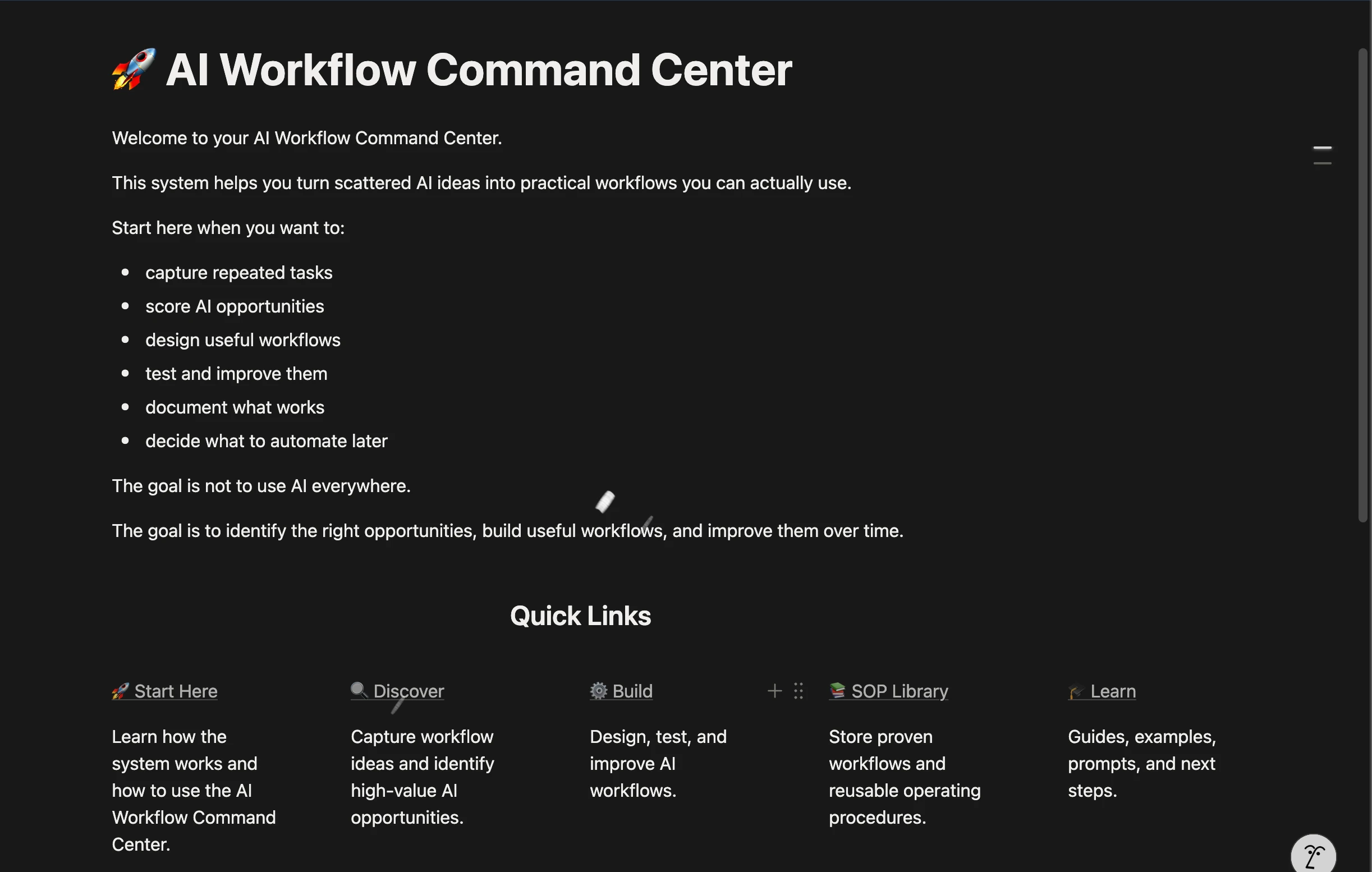
Start Here and the Command Center
Orient yourself, see the operating rules, and choose the next useful place to work.
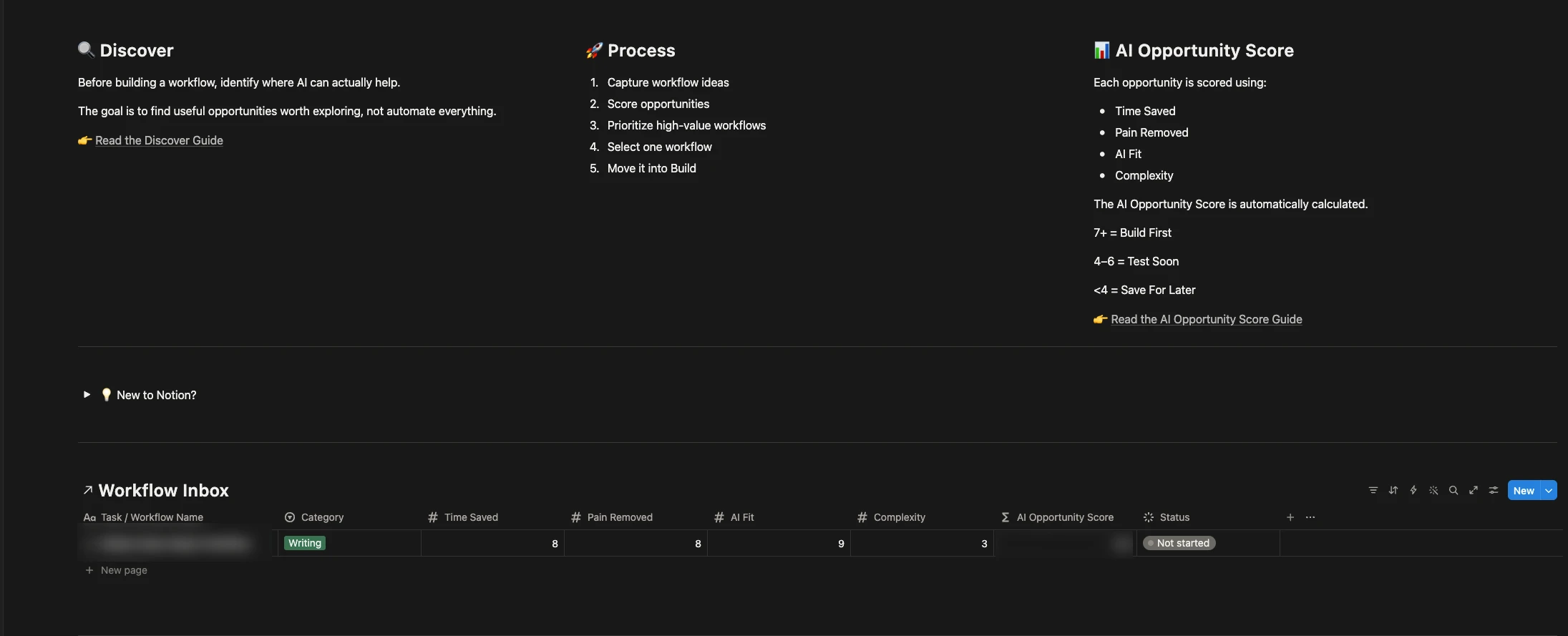
Discover and score opportunities
Capture repeated work, assess time saved, pain removed, AI fit, and complexity, then choose what is worth testing.
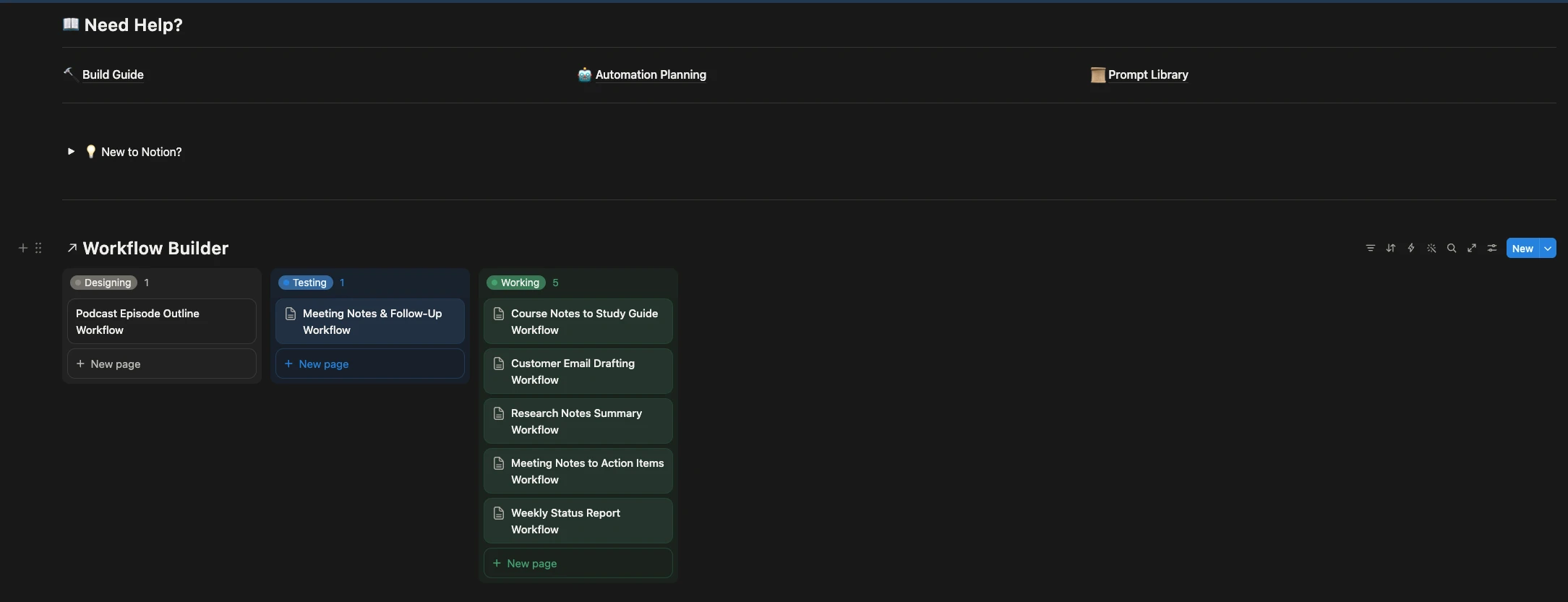
Build and test one workflow
Move a selected idea through Designing, Testing, and Working instead of leaving it as an unfinished note.
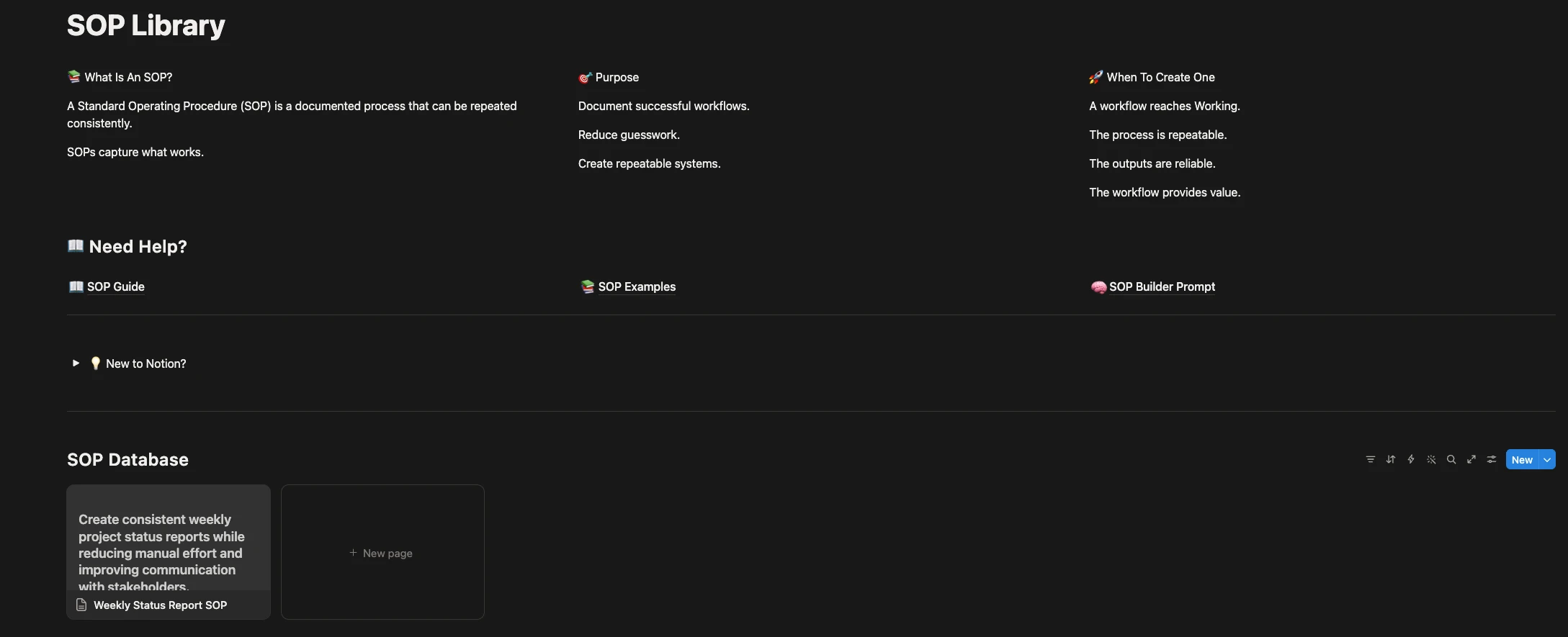
Document what works
Turn a proven workflow into a reusable SOP with context for the next time you or your team needs it.
A practical path through the system
From “weekly status reports take too long” to a documented workflow.
For example: capture the repeated reporting job, score its value and complexity, design a small reporting process, test it with real inputs, and save the working version as an SOP. Then decide whether connected automation would help.
Illustrative score
Weekly status report
- Time saved: 8
- Pain removed: 8
- AI fit: 9
- Complexity: 3
This example lands in the workspace's Build First band. The score makes the reason visible; it does not promise an outcome.
What happens next
Test the process before the automation
- Define the inputs for one real report.
- Write the smallest useful sequence.
- Run it with real information and review the result.
- Save the version worth repeating, then decide whether to connect tools later.
Fit check
Choose the Command Center when planning is the missing step.
Choose it if…
- Repeated work is scattered across chats, notes, and loose prompts.
- You need help deciding what is worth improving first.
- You want to test workflows before investing in connected automation.
- You want a Notion home for documenting what works.
- You are willing to use Notion.
This is probably not for you if…
- You want a fully automated SaaS product.
- You dislike using Notion or do not want a workspace to maintain.
- You want AI to replace human review and decision-making.
- You want a large course instead of a working planning system.
One-time purchase
Give useful workflow ideas a place to become repeatable.
$29 USD
Get the complete Notion workspace, connected Notion databases, planning prompts, examples, and guidance for moving one repeated problem from idea to documented workflow.
Notion account required. Delivered as a duplication link after purchase. Includes a 14-day refund window if it is not the right fit.
Purchase details
What you receive, and what stays yours to decide.
This is a planning and documentation workspace. It gives you structure for the work before an automation or external tool takes action.
- Included
- Dashboard, Start Here, Discover and scoring tools, Workflow Factory, SOP Library, Learn guidance, prompts, and examples.
- Requirement
- A Notion account. The template is delivered as a duplication link after purchase.
- First session
- Capture 3 to 5 repeated jobs, score one, then build and test a small workflow.
- Not included
- Managed software, custom implementation, consulting, connected automations, or third-party AI accounts.
- License and support
- One person or one business. Internal team members may use the workspace for that business. Contractors may use it only while working for the licensed business and may not retain or share a copy afterward. Email support covers reasonable delivery and access problems, not custom setup.
- Updates and refund
- The purchase includes this version. Future updates are not promised. Email michael@getprompting.com within 14 days for help with access or fit. If it is still not right, GetPrompting will refund the purchase to the original payment method.
Compare before you decide
Choose the smallest system that solves the current problem.
Use the process products when clearer execution or planning is the problem. Choose the technical system only when connected n8n execution is already the job.
Process maturity path
Clarify how work should run, then preserve the decisions that make it repeatable.
Creator SOP Pack · $19
Clear steps and review gates for manual repeated work.
See the SOP PackAI Workflow Command Center · $29
Plan, score, test, and document workflow candidates in Notion.
Current pageStart with the Free SOP Library if you want a smaller sample first.
Adjacent technical system
The Creator Workflow System is a separate n8n product. Choose it when you are ready to configure connected execution; the Command Center is not a prerequisite.
See the Creator Workflow SystemQuestions before you buy
Questions, answered plainly.
Is this an automation tool?
No. It helps you plan, test, and document workflows before you decide whether automation is appropriate.
Do I need to know how to code?
No. The product is designed around workflow planning and documentation. It does not require coding or an automation platform to begin.
Do I need Notion?
Yes. The Command Center is a Notion template and is delivered as a duplication link after purchase.
How much upkeep does the workspace need?
A simple upkeep habit keeps it useful: review new inbox items, update the status of active tests, archive ideas you are not pursuing, and document workflows that earn another run. If you do not want to maintain those decisions in Notion, this is probably not the right product.
What happens after purchase?
You receive the Notion duplication link, duplicate the workspace into your account, open Start Here, and choose one repeated problem to work through first.
Can I use it for client work?
Yes. One person or one business may use it for internal and client work. A client needs their own license if they need a reusable or duplicable copy.
Are future updates included?
The purchase includes the version described here. Future updates are not promised unless GetPrompting says so explicitly.