
Quick Copy
AI Workflow Planning Prompt
Paste this into your AI tool when you want to map a repeatable process before choosing automation tools.
Help me design an AI workflow for this recurring task:

Goal:
Inputs:
Trigger:
AI decision or generation step:
Tools or apps involved:
Human checkpoint:
Failure case to watch for:
Definition of done:
Most people start using AI the same way.
They open ChatGPT, Claude, Gemini, or another AI assistant, type a question, get an answer, and move on.
That works.
At least for a while.
If you are trying to decide whether a task needs a simple workflow or something more agentic, start with the broader breakdown of AI agents, bots, workflows, and agent harnesses.
If you are shaping a workflow beyond the first draft, three decision points matter: when an AI agent is the wrong tool, how to package an n8n workflow template, and how to think through AI workflow cost and privacy before the system runs every day.
When the workflow is ready to take a meaningful action, the review gate is where the system becomes practical instead of merely clever. The walkthrough on adding human approval to an n8n AI workflow shows where to pause before AI output is sent, saved, published, or acted on.
For a concrete audio-output example, see how to use ElevenLabs with n8n. It keeps text-to-speech as one reviewable workflow step: approved text in, an MP3 artifact out, and a person still deciding what happens next.
If you want to run that audio step locally instead, this local Qwen TTS with n8n guide shows the same reviewable output pattern with a Docker host bridge, a local service, and a WAV artifact.
Not sure whether a hosted voice tool or a local runtime fits the work better? The Qwen TTS vs ElevenLabs comparison explains when convenience, local control, maintenance, and data boundaries should shape that choice.
If the next step is letting an AI client call an automation, start with a narrow tool boundary. This MCP for n8n guide shows how to expose one selected workflow, test with synthetic data, and keep human review before side effects.
But eventually something frustrating happens.
Once that workflow starts running in the real world, the next question is what happens when it breaks. The n8n error-handling walkthrough covers retries, human review, and useful logs before a failed execution becomes a mystery.
When the execution is green but the real-world result is missing, use this guide to diagnose why an n8n workflow works once and then breaks before rebuilding the automation.
You find yourself rewriting the same instructions, uploading the same files, fixing the same formatting issues, and rebuilding the same process every time you need help.
You are using AI, but you have not built a system around it yet.
That is where AI workflows come in.
If you already have a workflow idea but are not sure whether it is clear enough to build, run it through the AI Workflow Preflight Checker before you choose tools or start wiring steps together.
An AI workflow turns a repeatable task into a structured process where humans, AI tools, data, and automation work together. If you want to see what that looks like in practice, start with this guide to build your first AI workflow. If the process itself is still difficult to explain, this guide to what an SOP is shows how to capture the steps and review points before choosing automation tools.
If the workflow depends on an MCP connector, debug the MCP connection before adding it to the workflow so the automation starts with evidence instead of guesswork.
A workflow is easier to reuse when the build includes documentation too. If your automation is built in n8n, this guide on documenting an n8n workflow shows how to capture setup notes, handoff details, and failure checks before the workflow becomes another mystery file.
For local n8n builds, reproducible configuration is part of the workflow too. This n8n environment variables walkthrough shows how to keep Compose settings, persistence, and local model routing inspectable before the workflow does useful work.
When the workflow needs real outside data, the pattern changes a little. The n8n SEO keyword research workflow with paid APIs shows how to combine AI seed expansion, DataForSEO keyword metrics, cleanup logic, and human review without asking the model to guess search data.
If that outside data is competitor movement, this competitor tracking workflow guide shows how to watch public sources, save snapshots, and add human review without turning the build into a scraping mess.
A support queue is a useful example of that same pattern. The AI support ticket triage workflow shows how to classify messy requests, return a predictable JSON shape, and stop for human review before a reply goes out.
The goal is not to replace yourself with a robot assistant living in your computer. Although, admittedly, that would make handling email a lot more interesting.
The real goal is much simpler:
Create systems where AI helps with the repetitive parts, while humans stay responsible for direction, creativity, and decisions.
In this guide, we will break down how AI workflows actually work, how the pieces connect together, and how tools like prompting, custom assistants, local AI, knowledge bases, and automation platforms fit into the bigger picture. If you are still learning AI fundamentals, start with Getting Started With AI first, then come back here when you are ready to turn those skills into systems.
Workflow Map: What Should You Build First?
The best AI workflow is not the most complicated one. It is the smallest repeatable process that saves time, improves quality, or makes work easier to review.
| If you want to… | Start here | Why it helps |
|---|---|---|
| Explain the process before automating | What is an SOP? | Helps you document the steps and review points first. |
| Build your first simple workflow | Build your first AI workflow | Shows the basic input, AI step, review, and output pattern. |
| Automate with n8n | Free n8n workflow library | Gives you working examples to study and adapt. |
| Decide where n8n should run | Local n8n vs VPS vs n8n Cloud | Helps you move a workflow only when uptime, webhooks, or maintenance make it worth it. |
| Keep private data local | Local AI for beginners | Shows how local models fit into workflow systems. |
| Add safer review points | Human-in-the-loop workflow guide | Keeps humans responsible for quality and decisions. |
| Decide whether a workflow can run unattended | Trustworthy AI automation guide | Helps you check inputs, logs, failure handling, and recovery before you look away. |
| Keep each project from getting messy | Clean project context guide | Shows how to organize source material, decisions, prompts, and outputs before the AI step runs. |
| Hand a workflow to another person | AI workflow handoff guide | Turns documentation, test data, access notes, and review gates into a usable handoff packet. |
If your starting point is a written process, this guide on turning an SOP into an AI workflow shows how to translate the steps into triggers, inputs, review gates, and outputs before you build the automation.
If you are choosing where to build, this n8n vs Zapier vs Make comparison for AI workflows explains how to pick based on speed, visual mapping, local AI, and long-term control.
If n8n is the tool you are testing and you are wondering whether to use an agent or regular workflow nodes, this n8n AI Agent vs regular workflow nodes guide explains the practical beginner decision.
When the workflow includes a model call, the next decision is where that model should run. This local AI vs cloud AI comparison walks through when to use local models, hosted models, or a hybrid setup.
If you want the review layer before building deeper automations, start with this guide to human-in-the-loop AI. It explains where people should review, approve, or stop an AI workflow before the final action happens.
If you want the easiest entry point into app-to-app automation, this beginner guide to Zapier explains how triggers, actions, and small AI steps fit into practical workflows.
If the workflow needs a visual map with routes, filters, and several connected modules, this beginner guide to Make.com explains where it fits in AI automation.
For a concrete Make-shaped build, this Make and Notion idea intake automation shows how a visual scenario can capture ideas, route them by status, and stop at human review before anything gets published.
If you are ready to connect an assistant to real files or tools, this plain-English guide to MCP explains the adapter layer that can make those connections cleaner.
Why Random AI Usage Eventually Breaks Down
If you want concrete starting points, this guide to AI workflow examples for beginners breaks the pattern into notes, research, outlines, prompts, SOPs, email drafts, social posts, and runbooks.
Using AI without a workflow usually feels great at first.
You discover you can generate ideas faster, summarize information, rewrite content, and solve problems in completely new ways.
Then the cracks start showing.
The prompt that gave you a great result last week is buried somewhere in your chat history. You spend time explaining the same background information over and over again. Some outputs are exactly what you wanted, while others feel like you are starting from scratch.
Eventually, you realize the AI tool is helping, but you are still manually connecting all the pieces yourself.
The problem usually is not the AI model.
The problem is the missing process around it.
Imagine hiring a new employee but never explaining your process, never giving examples, and never showing them where information lives.
You probably would not expect perfect results.
AI works the same way.
Better systems usually create better outputs.
What Is an AI Workflow?
An AI workflow is a repeatable system that uses artificial intelligence as part of a larger process.
Instead of thinking about AI as one chatbot conversation, think about the entire path information travels. Sometimes that path starts with converting audio into text before the AI can summarize, classify, or route the information.
Input
↓
Context & Knowledge
↓
AI Processing
↓
Review
↓
Output
Almost every practical AI system follows some version of this pattern.
A simple meeting workflow might look like this:
Meeting Notes
↓
Project Context
↓
AI Summary + Action Items
↓
Human Review
↓
Saved Team Notes
The same pattern works for many different tasks. You provide information, add the right context, let AI handle a focused step, review the result, and store the output somewhere useful. For a concrete example of that pattern, I built an n8n workflow that turns messy notes into a Google Doc action brief.
When the source is meeting notes or a voice memo, the useful output may be a presentation plan instead of another summary. The slide-deck brief walkthrough shows how to turn meeting notes or voice notes into a slide deck brief before generating slides.
When that review step needs a clearer standard, use this AI output review checklist to check format, claims, assumptions, risk, and the next action before the workflow moves forward.
Once the workflow starts running, it also needs a readable trail. An AI workflow audit log keeps inputs, outputs, review decisions, errors, and side effects from disappearing into memory.
If you want to study several small examples instead of starting from a blank canvas, the Free n8n Workflow Library collects practical starter workflows built around this same input, AI step, review, and output pattern.
A more advanced version might automatically collect information, send it through an AI model, organize the response, and save the result without manually copying information between tools.
Different tools. Same basic idea.
The workflow matters more than the individual tool.
The AI Workflow Framework
If an MCP server is the next tool in your workflow, start with a bounded permission test instead of connecting every folder, account, or API at once.
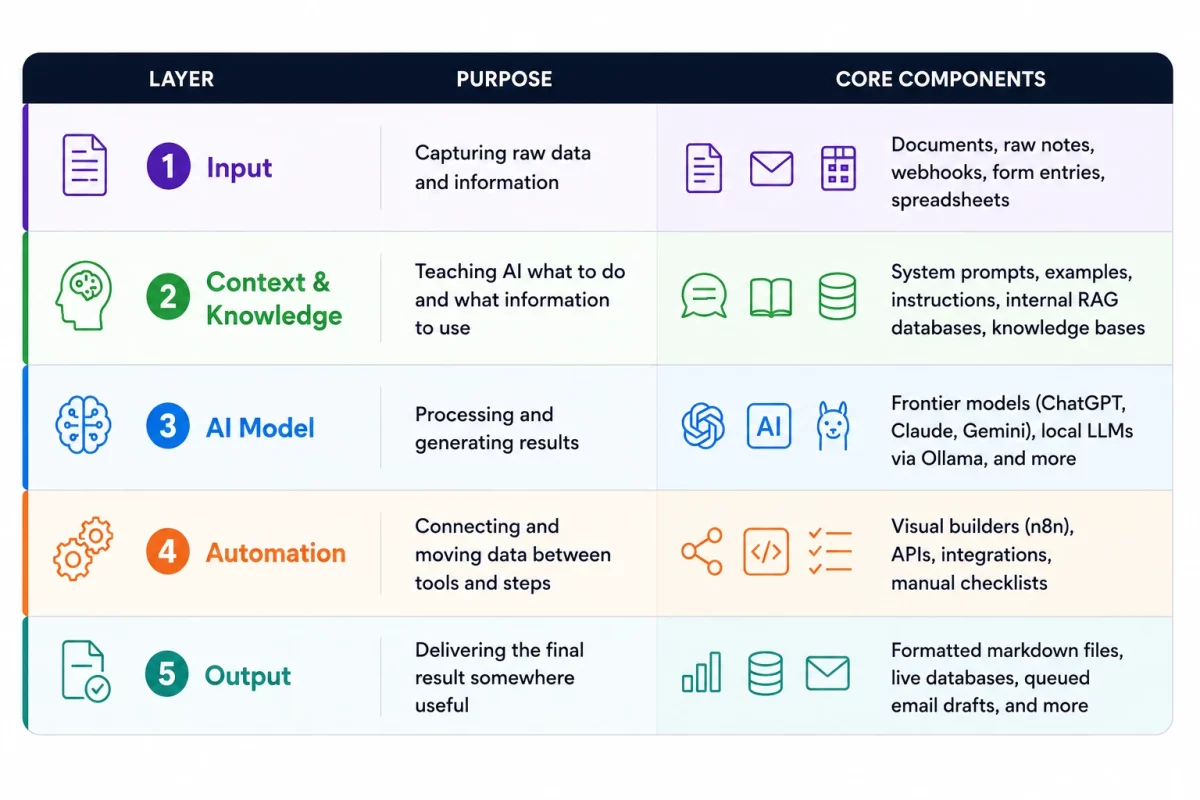
Most AI workflows can be understood as several connected layers.
Thinking in layers makes it easier to decide what you actually need instead of chasing every new AI tool that appears.
Input Layer
↓
Context & Knowledge Layer
↓
AI Model Layer
↓
Automation Layer
↓
Output Layer
Input Layer: Where Information Starts
The input layer is the raw information entering your workflow.
Common inputs include:
- Documents and PDFs
- Emails and messages
- Forms and survey responses
- Meeting transcripts
- Spreadsheets or structured data
- Research notes
- Ideas and rough drafts
For example, a content workflow might start with a rough idea, while a business workflow might start with a customer request or spreadsheet.
Good workflows start by understanding what information you have, where it comes from, and what you want it to become.
Without a clear input, even the best AI model is just guessing what you need. If that first handoff feels messy, start by learning how to clean messy inputs before using AI before you turn the task into a repeatable workflow.
Context & Knowledge Layer: Teaching AI What It Needs to Know
The context and knowledge layer is where many AI workflows succeed or fail.
An AI model can only work with the instructions and information it has available.
If you provide vague instructions with no background information, you will usually get generic results.
If you provide clear instructions, examples, constraints, and relevant knowledge, the same AI model can produce dramatically better results.
A simple way to think about this layer:
Context = How AI should complete the task

Knowledge = The information AI uses to complete the task
Context might include:
- Prompts and instructions explaining the goal
- Examples showing what a good result looks like
- Formatting requirements
- Writing style guidelines
- Rules and constraints the AI should follow
Knowledge might include:
- Company documentation
- Research notes
- Training material
- Project information
- Large collections of files
This is why prompt engineering is still an important part of building reliable AI workflows. A workflow built on unclear instructions will usually create inconsistent results.
Even major AI companies document the importance of clear instructions and context. OpenAI’s prompt engineering guide provides additional examples of how better instructions can improve AI responses.
Since context is one of the biggest reasons AI workflows succeed or fail, learning how to give AI better instructions is a great place to start. My Ultimate Guide to Prompt Engineering explains how to build that foundation.
As your workflows grow, you may eventually move beyond rewriting the same prompts manually.
For example, a custom assistant can store your instructions, examples, and resources so you do not rebuild the same context every conversation.
You can learn more about that approach in my guide on building custom GPT workflows.
For larger workflows, manually adding information every time does not scale. Instead, you may need systems that allow AI to search and retrieve the right information when needed.
This is where techniques like retrieval augmented generation (RAG) become useful. Instead of expecting the AI model to magically know everything, the workflow provides the right information at the right time.
If you want a deeper explanation of how that works, check out What Is RAG?.
AI Model Layer: Choosing the Engine
The AI model layer is where the actual processing happens.
This is the part most people think about first, but it is only one piece of the workflow.
The model might:
- Summarize information
- Extract important details
- Create drafts
- Analyze patterns
- Transform information into another format
Different workflows may use different AI models depending on the goal.
A simple writing workflow might use ChatGPT or Claude. A privacy-focused workflow might use a local model running directly on your computer.
The important lesson is this:
The AI model is the engine. The workflow is everything that makes the engine useful.
If you are interested in running models yourself, my Local AI for Beginners guide explains how local models fit into your AI setup.
Automation Layer: Connecting Everything Together
The automation layer connects different parts of your workflow so information can move between tools.
This is where AI starts becoming more than a chatbot.
Instead of manually copying information between apps, automation tools can connect steps together.
For example:
Form Submission
↓
AI Summary
↓
Format Result
↓
Save to Spreadsheet
↓
Send Notification
Tools like n8n, Zapier, and Make help create these connections without building everything from scratch. The official n8n documentation is also a great resource when you want to explore available integrations and learn how different workflow nodes work.
If you are still choosing the platform layer, this guide to AI automation tools for practical workflows compares where different automation tools fit before you commit to a build.
For example, you could collect information from a form, send it through an AI model, clean up the response, and automatically save the finished result into Google Sheets.
Instead of copying information between tools manually, the workflow handles the repeatable steps for you.
This does not mean every workflow needs automation.
Sometimes a manual checklist is enough. Automate when it removes repeated work, not just because automation sounds impressive.
If you want to experiment with automation, my beginner guide to n8n explains how these visual workflow builders work.
And if you want a practical example, you can follow my first n8n workflow tutorial where we connect local AI with Google Sheets.
Output Layer: Making AI Results Useful
For local AI workflows, a useful output is usually more than a block of text. This example shows how to build a local workflow with a defined output contract so the next step can inspect the result before acting on it.
When approved text needs to become a reviewable audio file, this ElevenLabs review shows the same output pattern in practice: a dashboard generation or an n8n API step, followed by a human listen-back before the file is used.
The output layer is where your AI result becomes something you can actually use.
This step gets overlooked constantly.
A great AI response sitting forgotten in a chat window does not improve your workflow.
The result needs somewhere to go.
- A document
- A spreadsheet
- A database
- A project management system
- An email draft
- A published piece of content
Good AI workflows do not stop when the AI responds.
They end when the information is organized, reviewed, and ready to create value.
Examples of Complete AI Workflows
Build Guides: Learn the Pattern by Making Something Small
If the framework feels abstract, these n8n build guides show the same AI workflow pattern in smaller pieces. Each one starts with a specific input, uses AI for one focused job, and ends with an output you can review or reuse.
- Search Intent Blog Outline Builder for turning a topic into a useful article structure.
- RSS Research Digest for summarizing recurring research sources.
- Prompt Starter Library Builder for saving reusable prompts instead of losing them in chat history.
- YouTube Transcript Cleaner for turning raw transcripts into cleaner Markdown.
- Research Collector for capturing useful links and turning them into organized notes.
- Social Post Generator for repurposing one source into platform-ready drafts.
- Professional Email Builder for turning rough notes into a reviewed email draft.
- Markdown Knowledge Base Builder for cleaning scattered notes into structured files.
If you want to inspect real examples instead of staying in theory, start with the Free n8n Workflow Library. It shows small workflow patterns you can import, test, and customize.
Before you connect more tools, write down the workflow requirements. Once you understand the layers, AI workflows become easier to design.
You stop asking, “What AI tool should I use?” and start asking, “What system am I trying to improve?”
Here are a few examples of how these pieces come together.
Content Creation Workflow
A content workflow is not just asking AI to write an article.
A stronger system might look like this:
Idea
↓
Research
↓
AI Organization
↓
Draft Creation
↓
Human Editing
↓
Publishing
The AI helps organize and speed up parts of the process, but the strategy, experience, review, and final decisions still come from the person using the system. If content production is the workflow you want to systematize first, the Creator Workflow System is the packaged n8n version of that idea.
Research Workflow
A research workflow helps turn scattered information into something useful.
Instead of collecting dozens of links and hoping you remember them later, you can create a process:
Collect Sources
↓
Summarize Information
↓
Extract Important Ideas
↓
Save Knowledge
↓
Reuse Later
More advanced versions of this idea can connect AI models with searchable knowledge systems, databases, or personal research libraries.
Business Automation Workflow
Business workflows often focus on reducing repetitive manual steps.
For example:
Customer Request
↓
AI Classification
↓
Generate Summary
↓
Save Result
↓
Notify Team Member
This type of workflow does not remove the human from the process. It helps organize information so people can spend more time making decisions instead of moving data around.
Manual Workflows vs Automated Workflows
One of the biggest mistakes beginners make is assuming every AI workflow needs automation.
It does not.
A manual workflow you use every day is usually more valuable than an advanced automation you never finish.
A good progression usually looks like this:
Manual Process
↓
Repeatable Workflow
↓
Reusable Templates
↓
Partial Automation
↓
Full Automation
Start by proving the workflow works. Then automate the pieces that create the most friction.
Where AI Agents Fit Into Workflows
AI agents are becoming one of the most discussed areas of AI automation.
But agents are not a replacement for workflow design.
An AI agent is usually a piece inside a larger system. It may help make decisions, use tools, complete steps, or choose actions based on instructions.
The workflow still matters.
Giving an AI agent access to tools without a clear process is like hiring an employee, giving them passwords to everything, and saying “figure it out.”
Structure comes first. More autonomy comes later.
Common AI Workflow Mistakes
Building better AI workflows is often about avoiding unnecessary complexity.
Starting With the Tool Instead of the Problem
New AI tools appear constantly.
It is tempting to start with the newest platform and look for a reason to use it.
A better approach is identifying a repeated problem first, then choosing the tool that fits.
Removing Human Review Too Quickly
Automation is useful, but not every step should disappear.
For important decisions, keep review points where a person checks the final result.
A reliable workflow also needs a clear way to stop when the result is uncertain. The human-in-the-loop workflow guide separates technical errors from review handoffs, saves the project state, and resumes safely. Before you let that workflow run without supervision, use the AI automation safety checklist to define stop reasons, safe retries, review gates, and readable logs. If you want a reusable operating document for that step, the AI automation runbook template gives you a practical place to capture the trigger, inputs, stop reasons, side effects, retry rules, and owner.
Building Systems Too Complicated to Maintain
A workflow with fifty steps is not automatically better than a workflow with five.
The best workflows are understandable, testable, and easy to improve.
Frequently Asked Questions About AI Workflows
What is the easiest AI workflow to build first?
The easiest AI workflow to build first is a simple notes-to-summary process: start with messy input, ask AI to organize it, review the result, and save the clean output somewhere useful.
Should I automate an AI workflow right away?
No. It is usually better to run the workflow manually first, prove the process works, then automate the repetitive steps that create the most friction.
What are AI workflows?
An AI workflow is a structured process that connects AI tools, information, and human review steps to complete a task more consistently. Instead of using AI through random one-off conversations, workflows create repeatable systems that can be reused and improved over time.
Do AI workflows require coding?
No. Many AI workflows can be created without writing code. Simple workflows can use AI assistants, saved prompts, templates, and no-code automation tools.
What is the difference between AI workflows and AI automation?
An AI workflow is the overall process. AI automation uses tools to automatically complete parts of that process. A workflow can exist with or without automation.
Are AI agents the same as AI workflows?
No. AI agents can be part of an AI workflow, but they are not the entire system. Workflows define how information moves, what steps happen, and where humans or AI tools contribute.
Final Thoughts: Build Systems, Not Random AI Experiments
The biggest shift with AI workflows is moving from random conversations to repeatable systems.
Individual prompts, tools, and models are useful, but they become much more powerful when they work together.
Start small. Understand your process. Add AI where it helps. Automate when it makes sense. If you are not sure what to build first, this guide to AI workflow planning before automation gives you a simple canvas for mapping the task before you wire tools together.
The future of AI is not just having better tools.
It is learning how to build better systems with them.
Stay curious, keep experimenting, and as always…
Stay sharp,
Free AI Workflow Kit
Map the workflow before you start wiring nodes.
Define the input, output, review step, and failure condition with the workflow tools inside the combined GetPrompting Starter System.
Move from example to working system
Test the boundary before you automate the whole process.
Inspect a working n8n example first. If the workflow is fragile, customer-facing, or expensive to get wrong, ask Michael to review it.