
Research gets noisy fast.
You subscribe to a few useful feeds, save a few links, skim a few updates, and suddenly your “research system” is just another pile of things you meant to read later.
This n8n RSS research digest workflow helps you turn feed updates into a focused digest you can actually review and use.
The point is not to summarize everything equally. That usually just creates a shorter version of the same noise. The useful move is filtering through a topic lens first, then letting AI help organize what is worth your attention.
That same source-first pattern is useful for competitor monitoring too. This competitor tracking workflow guide explains how to use feeds, public updates, snapshots, and review gates before you reach for brittle scraping.
This is the third workflow in the GetPrompting Free n8n Workflow Library. It builds on the first two workflows: the Daily Action Brief Builder taught cleanup and structure, and the Search Intent Blog Outline Builder taught planning before drafting.
This workflow teaches a new pattern:
feed items -> topic lens -> AI triage -> reviewed digest -> useful research doc
Quick Copy
RSS Digest Prompt
Use this manually before wiring the full workflow. If the prompt helps by hand, it is worth automating.
You are creating a practical research digest.

RSS items:
[PASTE TITLES, LINKS, AND SHORT EXCERPTS]

Topic lens:
[WHAT YOU CARE ABOUT]

Audience:
[WHO THE DIGEST IS FOR]

Digest goal:
[WHAT THE DIGEST SHOULD HELP YOU DO]

Return:
- top themes
- must-read items
- why each item matters
- practical use for each item
- content or workflow ideas
- parked items
- human review note
What the RSS Research Digest Does
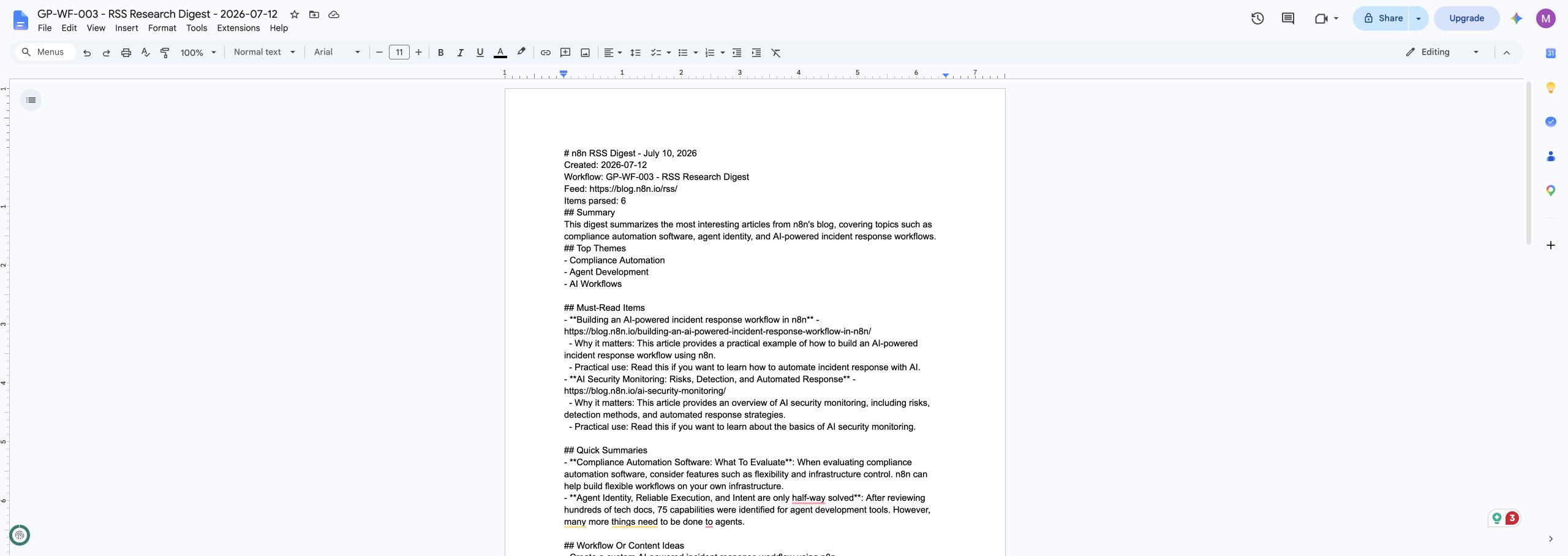
The workflow takes RSS feed URL, topic lens, target audience, digest goal, max item count, and fallback items and turns them into a Google Doc with top themes, must-read items, short summaries, practical uses, content ideas, parked items, and review notes.
The important part is not that the workflow is complicated. It is that the workflow creates a real document you can review, edit, and use. That is what separates a practical automation from a fun demo.
Why This Workflow Matters
This workflow teaches filtering before summarizing. Instead of asking AI to summarize everything blindly, you give it a topic lens so the digest supports a real goal.
This matters because beginners often try to automate the exciting part first. They jump straight to agents, dashboards, and complicated branching logic before the core pattern is reliable. I like starting smaller. Make one useful thing work. Then make it better.
That approach is slower for about five minutes and faster for everything after that. Once the base workflow is understandable, you can change the model, destination, trigger, or output format without rebuilding from scratch.
Affiliate disclosure: If you use the n8n Cloud link below, GetPrompting may earn a commission at no additional cost to you.
Need somewhere to run this workflow? If you do not already have an n8n workspace, n8n Cloud is the easiest hosted option. Prefer self-hosting or local testing? Use the Docker setup guide.
What You Need Before You Build It
The version I built uses n8n, Ollama, a local chat model, and Google Docs. You can change those pieces later, but this setup makes the workflow easy to inspect and test.
- n8n running locally, self-hosted, or in n8n Cloud
- Ollama running locally if you want the local AI version
- a local chat model such as
llama3.1:8b, or another model your machine runs reliably - a Google account
- Google Docs credentials connected inside n8n
Download the Free n8n Workflow
I published the clean workflow export on GitHub so you can import it, inspect it, and adapt it to your own setup.
Download the RSS Research Digest workflow on GitHub
The repo includes the n8n workflow JSON, screenshots, sample input, sample output, installation notes, customization ideas, and troubleshooting docs.
The public export does not include my private credentials, OAuth tokens, workflow IDs, API keys, or account details. After importing it, you will still need to connect your own Google Docs credential inside n8n.
How This n8n RSS Research Digest Workflow Works
Here is the practical flow:
Manual Start -> Set Workflow Inputs -> Fetch RSS Feed -> Parse RSS Items -> Build AI Prompt -> Generate With AI -> Review AI Output -> Prepare and Write the Google Doc
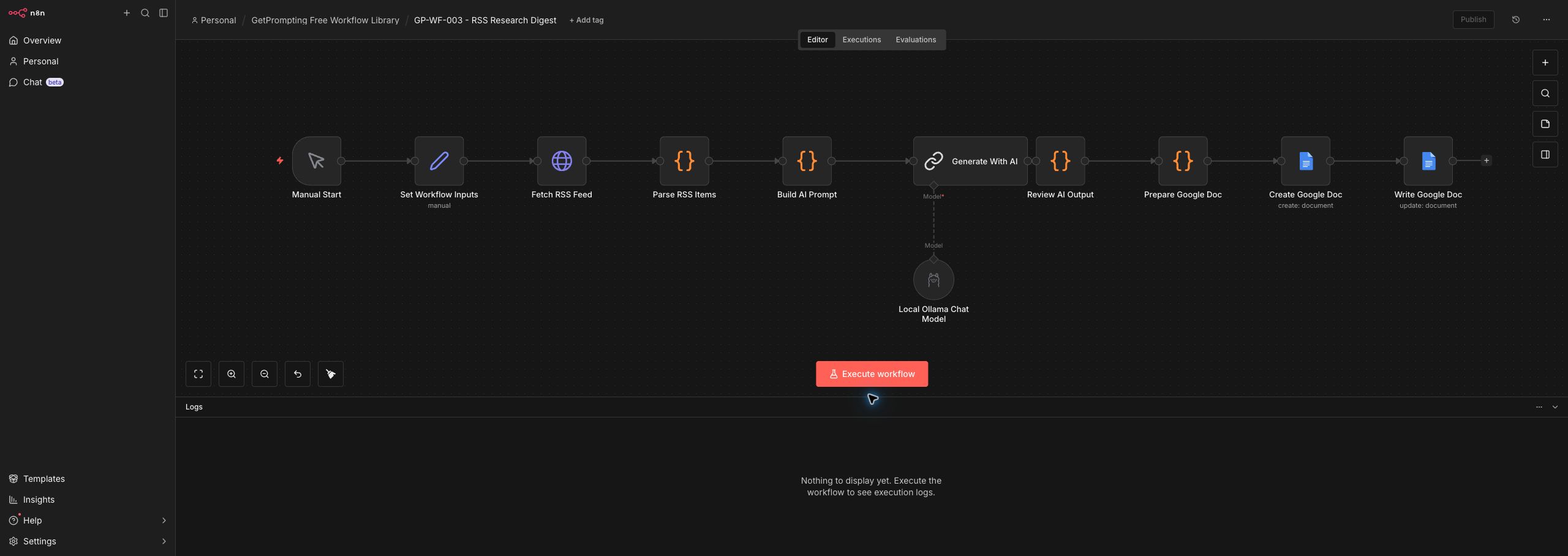
Let us walk through the main pieces.
1. Manual Start
The workflow starts manually so you can test one feed before adding schedules. That keeps the first version easy to debug.
2. Set Workflow Inputs
This node stores the feed URL, topic lens, audience, and digest goal. The topic lens is the important part because it tells the workflow what counts as useful.
3. Fetch RSS Feed
The HTTP request node pulls the latest feed content. This gives the workflow fresh material without making you manually copy every article title.
4. Parse RSS Items
This code node trims the feed down into readable items the model can use. It keeps the AI step focused on the feed entries instead of raw XML noise.
5. Build AI Prompt
The prompt asks the model to triage the feed through your topic lens, not summarize every item with equal weight.
6. Generate With AI
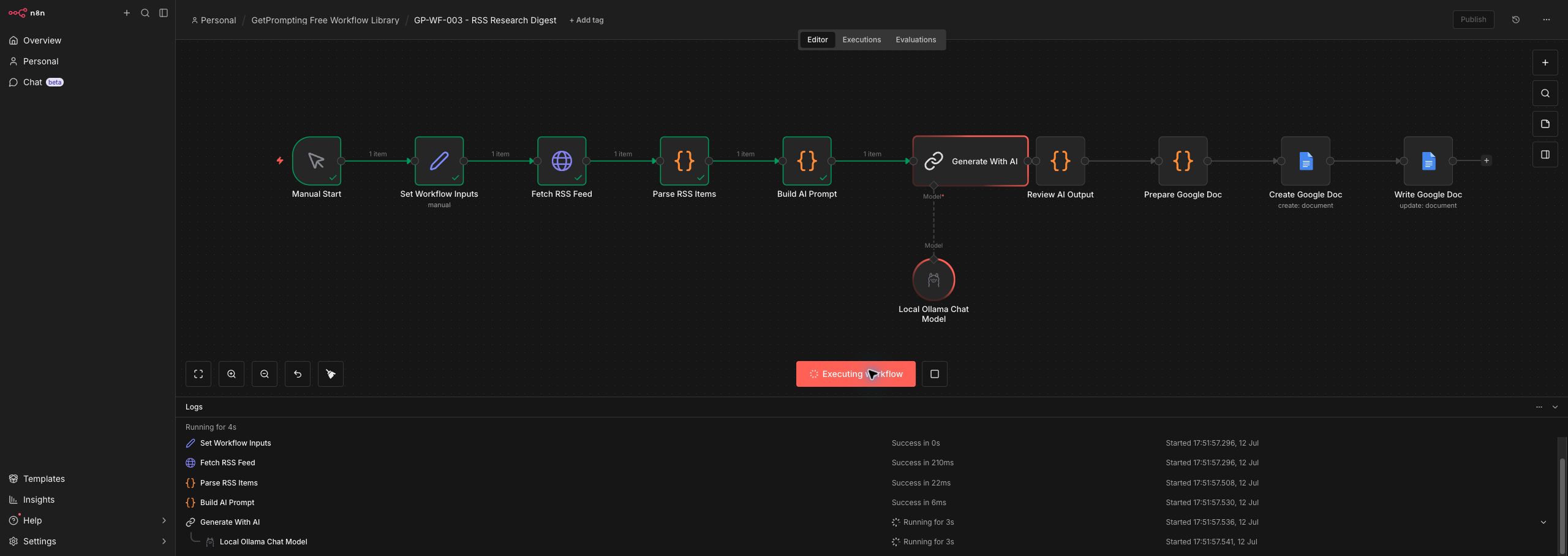
The local model turns the parsed items into themes, must-read entries, practical uses, and parked items.
7. Review AI Output
This cleanup node parses the model response and formats it into a digest structure. It is the guardrail between model output and the final document.
8. Prepare and Write the Google Doc
The final nodes create a document you can review, save, and use as research input for articles, workflows, or newsletters.
The New Concept This Workflow Teaches
This workflow teaches filtering before summarizing. Instead of asking AI to summarize everything blindly, you give it a topic lens so the digest supports a real goal.
That concept is the reason this article exists as its own piece instead of being a copy of the previous workflow guide. Each workflow in the library should add a useful idea you can carry into future builds.
Once you understand this pattern, you can reuse it in other workflows. The exact topic changes, but the habit stays the same: define the input, give the model a clear job, review the output, and send the result somewhere useful.
How to Customize This Workflow
The GitHub version is intentionally simple. That is a feature, not a limitation. A simple workflow is easier to understand, modify, and trust.
Change the Inputs
Open the Set Workflow Inputs node and replace the sample values with your own RSS feed URL, topic lens, target audience, digest goal, max item count, and fallback items. If you use this often, you can replace the manual fields with a form, webhook, Google Sheet row, Obsidian note, or Notion database item.
Change the Model
The default version uses a local Ollama model. Smaller models are usually faster and cheaper to experiment with. Larger models may follow complex instructions better, but they can be slower and more memory hungry.
You can also swap the local model for a cloud model through n8n if the workflow needs stronger reasoning. I would still keep the review step, because better models are not the same thing as perfect models.
Change the Output Destination
Google Docs is a friendly first destination because it is easy to read and edit. But you can point the same pattern to Obsidian, Notion, Airtable, Google Sheets, a local Markdown file, a task manager, or a custom dashboard.
Upgrade It Later
- Add a schedule trigger for a morning digest.
- Send must-read items to Obsidian or Notion.
- Add scoring for relevance, urgency, and content potential.
- Route different feed categories into separate digests.
Common Mistakes to Avoid
Summarizing every feed item equally
A digest is not a copy of the feed. It should help you decide what matters.
Skipping source verification
The workflow can summarize feed items, but you still need to open important links and verify claims before using them.
Using too many feeds too early
Start with one useful feed, prove the digest works, then add more sources later.
Where This Fits in a Bigger AI Workflow System
The RSS Research Digest is small on purpose, but it fits into a larger practical workflow system. It can sit beside the Daily Action Brief Builder, the Search Intent Blog Outline Builder, and the rest of the free n8n workflow library as one reusable tool in a larger process.
That is the real value of building these workflows one at a time. You are not just collecting templates. You are learning patterns: cleanup, planning, triage, structure, review, repurposing, documentation, and knowledge management.
Those patterns compound. A small workflow that solves one clear problem today can become a building block for a much more useful system later.
Where this fits: an RSS digest is a good example of an AI workflow that turns recurring information into something reviewed, summarized, and easier to act on.
Final Thoughts
The RSS Research Digest is not impressive because it is massive. It is useful because it gives one messy problem a clear path from input to output.
That is the kind of automation worth learning. It respects the human part of the work while using AI to handle the structure, cleanup, and first-pass organization.
If you want to experiment with it, download the free workflow from GitHub, import it into n8n, run the sample input once, and then replace the sample with something from your own work.
Start small. Make it useful. Then improve one piece at a time.
Stay sharp,
Michael
Creator of GetPrompting.com
Keep Building the Workflow Library
This guide is part of the Free n8n Workflow Library, a set of small n8n builds designed to be imported, inspected, and customized one workflow at a time. If you want the previous step in the series, read Search Intent Blog Outline Builder. The next build is Prompt Starter Library Builder, which adds another practical pattern without turning the system into one giant automation.
Next step
Ready to adapt this workflow?
Use the guide as a reference build, then decide whether to test it yourself or map the safer version for your own stack.
Open the GitHub repository, inspect the workflow export, and test one change at a time before trusting it with real work.
Open GitHub repoIf this needs to fit your CRM, content process, reporting setup, or local tools, a focused review can surface weak spots before you rebuild.
Ask Michael to review it