
Most people do not struggle to come up with article ideas.
They struggle to turn those ideas into something clear enough to write.
This n8n search intent blog outline builder gives you a practical way to turn a loose topic into a review-ready content brief before drafting.
That matters because a lot of AI content workflows go sideways at the first step. You ask the model to “write a blog post,” and it gives you something polished-looking that still does not know who it is for, what problem it solves, or why the article should exist.
The Search Intent Blog Outline Builder is designed to slow that moment down in a useful way. Before you draft, it helps you define the reader, the search intent, the content gap, and the outline.
This is the second workflow in the GetPrompting Free n8n Workflow Library. The first workflow, the Daily Action Brief Builder, focused on turning messy notes into a useful daily brief. This one teaches a different pattern:
topic idea -> search intent -> article brief -> human review -> usable outline
If you are new to the tools behind this workflow, start with What Is n8n?, What Is Ollama?, and Local AI for Beginners. You will have an easier time if you can already import a workflow, connect Google Docs, and run a local model.
Quick Copy
Search Intent Outline Prompt
Use this prompt manually before wiring the full workflow. If the brief helps you write a better article, then it is worth automating.
You are creating a search-intent-aware article brief.

Topic:
[YOUR TOPIC]

Target reader:
[WHO THIS IS FOR]

Desired outcome:
[WHAT THE READER SHOULD BE ABLE TO DO]

Search intent notes:
[WHAT THE READER IS REALLY TRYING TO SOLVE]

Competitor notes:
[WHAT CURRENT ARTICLES COVER OR MISS]

Unique angle:
[YOUR PRACTICAL POINT OF VIEW]

Return a clear content brief with:
- search intent
- reader pain point
- content gap
- reader promise
- article angle
- title options
- H2 outline sections
- examples to include
- internal link ideas
- things to avoid
- human review note
What the Search Intent Blog Outline Builder Does
This workflow takes a rough article idea and turns it into a structured content brief.
Instead of asking AI to write the article immediately, the workflow asks better planning questions first:
- Who is this article for?
- What is the reader actually trying to solve?
- What do competing articles usually cover?
- What do they miss?
- What is your useful angle?
- What should the reader be able to do by the end?
Those questions matter because good content is not only about filling a page. It is about matching the reader’s problem and giving them a useful path forward.
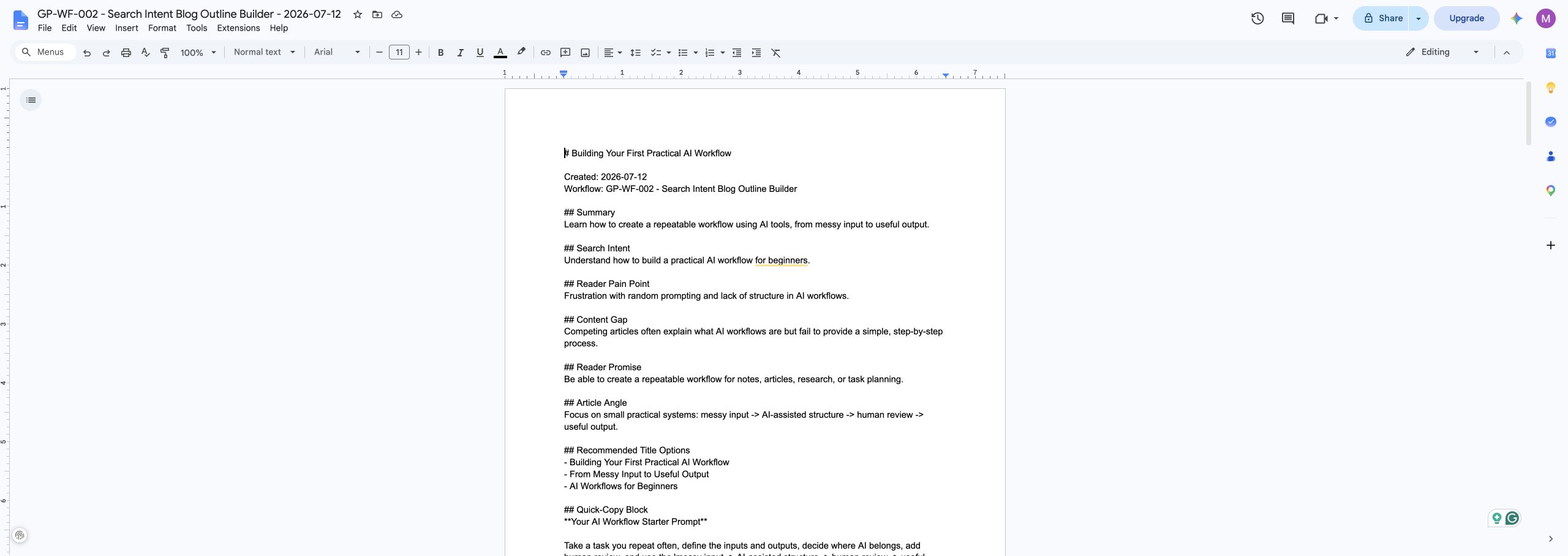
The final output is a Google Doc with search intent, reader promise, title options, outline sections, example ideas, internal link ideas, things to avoid, and a human review note.
Why This Workflow Comes After the Daily Action Brief Builder
The first workflow in this library taught a simple cleanup pattern:
messy input -> AI cleanup -> reviewed structure -> useful output
This second workflow builds on that, but adds a new skill: intent mapping.
Intent mapping means you are not only organizing text. You are deciding what the reader needs from the piece before you write it.
That is a bigger step. It moves the workflow from “clean this up” to “help me think through the shape of this content.”
You are still not handing the entire writing process to AI. The model helps organize the brief, but you keep the judgment. You decide what belongs, what sounds right, what needs experience, and what should be cut.
That is the sweet spot for this kind of workflow. AI gives you structure. You bring taste, context, and lived experience.
What You Need Before You Build It
The version I built uses n8n, Ollama, a local chat model, and Google Docs. You can swap pieces later, but this setup is easy to test because the workflow has a clear start and a clear output.
You need:
- n8n running locally, self-hosted, or in n8n Cloud
- Ollama running locally if you want the local AI version
- a local chat model such as
llama3.1:8b, or another model your machine runs reliably - a Google account
- Google Docs credentials connected inside n8n
If you want help choosing where n8n should run, my n8n setup guide walks through local, cloud, and self-hosted options.
Download the Free n8n Workflow
I published the clean workflow export on GitHub so you can import it, inspect it, and change it for your own writing process.
Download the Search Intent Blog Outline Builder workflow on GitHub
The repo includes the n8n workflow JSON, screenshots, sample input, sample output, installation notes, customization ideas, and troubleshooting docs.
The public export does not include my private credentials, OAuth tokens, workflow IDs, API keys, or account details. After importing it, you will still need to connect your own Google Docs credential inside n8n.
How This n8n Search Intent Blog Outline Builder Works
Here is the simple version of the workflow:
Manual Start -> Set Workflow Inputs -> Build AI Prompt -> Local AI Model -> Review AI Output -> Prepare Google Doc -> Create Document -> Write Document
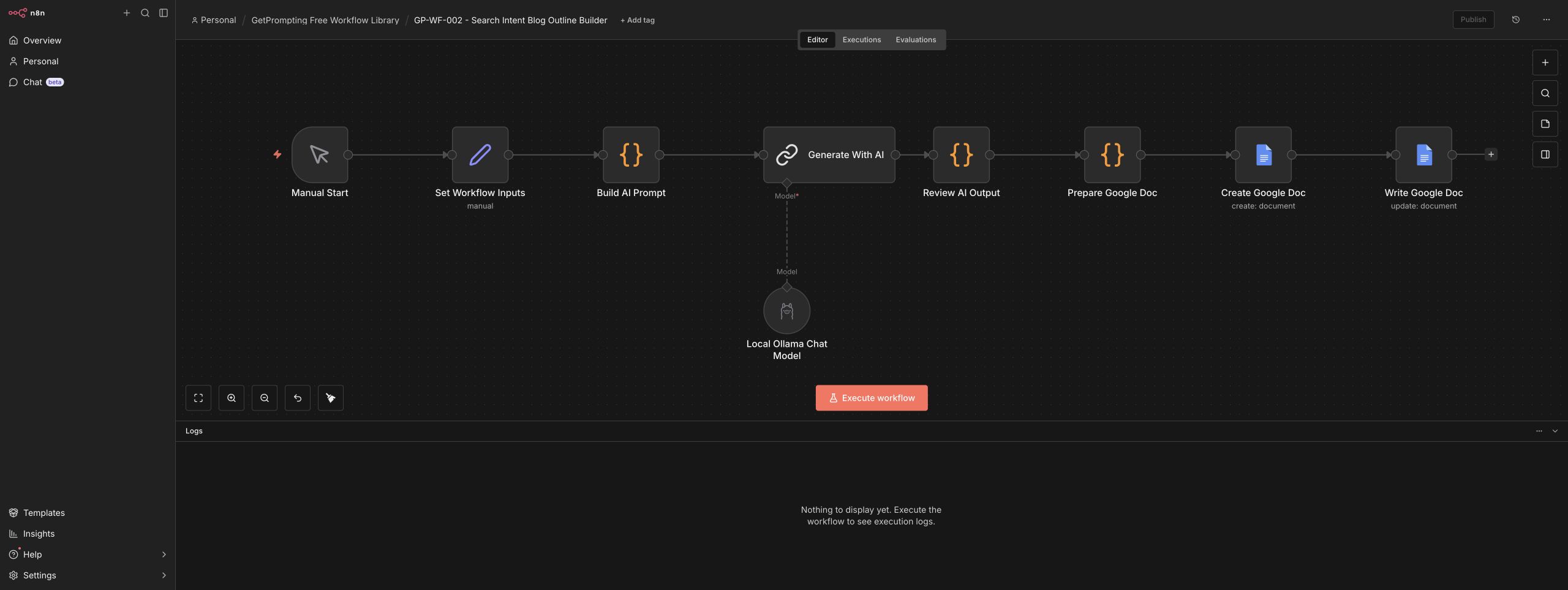
Let’s walk through the main pieces.
1. Manual Start
The workflow starts manually. That is intentional.
When you are building a new content workflow, you want to prove the logic before adding schedules, forms, webhooks, or extra tools. A manual start keeps the first version simple. You can run it, inspect the result, make changes, and run it again without debugging three other systems at the same time.
2. Set Workflow Inputs
This node holds the planning fields the workflow needs before it asks AI for anything.
The sample workflow includes fields for the topic, target reader, desired outcome, search intent notes, competitor notes, unique angle, required sections, and content format.
This is the part that makes the workflow useful beyond one example. You can replace the sample values with your own article idea, your own audience, and your own notes from the search results.
For example, instead of only writing:
Write an article about AI workflows.
You give the workflow more useful context:
Write for beginners who use AI tools but have not built repeatable workflows yet. They want practical examples, a clear starting point, and less confusion around agents, automation, and workflow terminology.
That second version gives the model a real job. The first version mostly gives it a fog machine.
3. Build AI Prompt
The prompt builder node turns the input fields into one structured request.
The important part is that it asks the model for a content brief, not a finished article. That keeps the workflow focused on planning.
The prompt asks for:
- search intent
- reader pain point
- content gap
- reader promise
- article angle
- title options
- outline sections
- quick-copy block idea
- internal link ideas
- things to avoid
It also tells the model to return valid JSON. That matters because the next nodes need predictable data, not a charming paragraph that changes shape every time.
This is one of the biggest lessons from the workflow:
If another node needs to use the result, ask AI for structure.
4. Generate With AI
The workflow sends the structured prompt to a local Ollama chat model.
I tested this with llama3.1:8b, but the exact model is less important than reliability. For this workflow, you want a model that follows instructions, returns structured output, and does not take forever on your machine.
Because this is a planning workflow, the model does not need to write perfect prose. It needs to help you think clearly. That is a much better job for a small local model than asking it to produce a final polished article in one shot.
5. Review AI Output
This code node parses the AI response and formats the brief into readable Markdown.
It also gives the workflow a safety layer. Even when you ask for JSON, models can occasionally wrap the response in extra text, use a slightly different field, or return something that needs cleanup. This node keeps the final document from depending on a perfect model response every time.
That is a useful mindset for AI automation in general. Do not assume the model will always behave. Build a review and cleanup step into the workflow.
6. Prepare Google Doc
This node turns the structured brief into a document body.
The document includes the article title, summary, search intent, reader pain point, content gap, reader promise, article angle, outline sections, link ideas, things to avoid, next steps, and a human review note.
This is where the workflow starts feeling practical. The output is no longer trapped inside an n8n execution panel. It becomes a document you can open, edit, and use when you sit down to write.
7. Create and Write the Google Doc
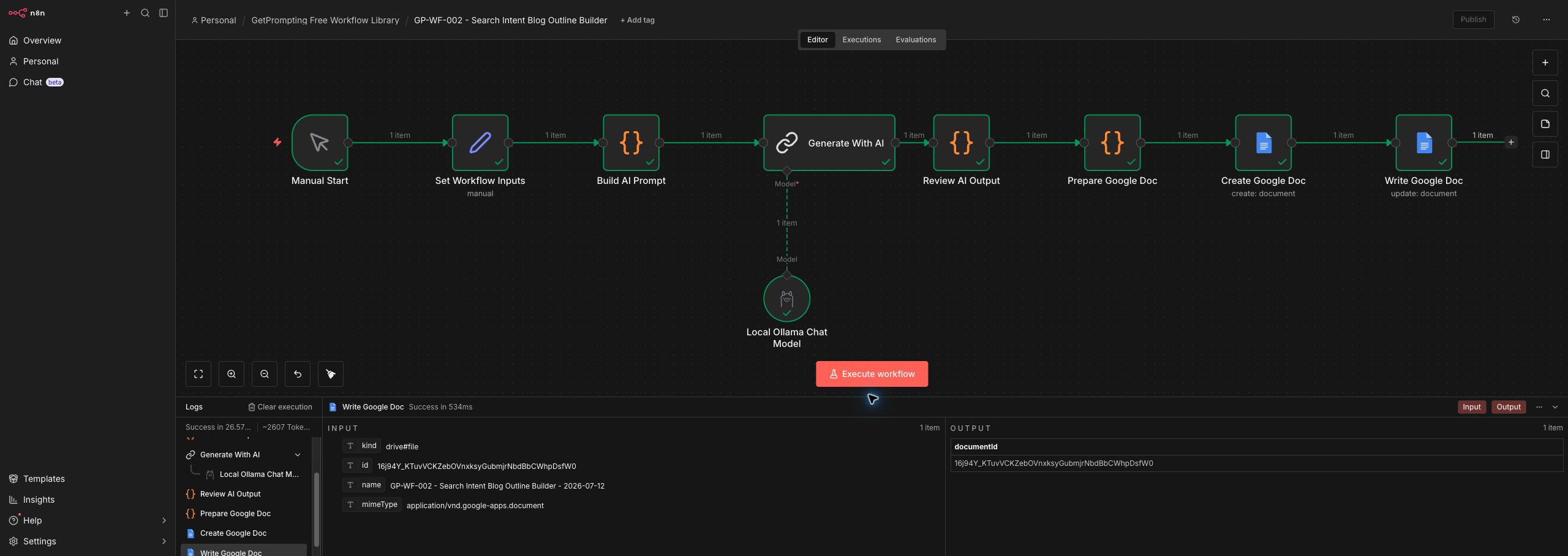
The final two nodes create a new Google Doc and insert the finished brief.
This gives the workflow a tangible output. That is important. A good automation should leave you with something useful, not just a green checkmark in the editor.
Why Search Intent Belongs Inside the Workflow
Search intent is the reason behind the search.
Someone searching “how to build an AI workflow” may not want a giant architecture diagram. They may want a simple starting point, a plain-English explanation, and one example they can actually copy.
If you skip that step, the article can become technically correct but still miss the reader.
This workflow makes search intent an input instead of an afterthought. That small change helps you avoid writing generic content. It also makes the outline easier to review because you can ask, “Does this section help the reader solve the thing they came here for?”
That question is simple, but it saves a lot of wandering.
How to Use Competitor Notes Without Copying Competitors
Competitor research can be helpful, but it has a trap.
If you only copy the structure of what already ranks, your article becomes a softer version of something that already exists. That is not a great place to be.
The better move is to use competitor notes to understand the shape of the search results, then look for what is missing.
For example, you might notice that current articles explain definitions well but do not show a beginner-friendly workflow pattern. Or they list tools but do not show what the output should look like. Or they talk about automation in broad terms but skip the human review step.
Those gaps become your opportunity.
The workflow includes competitor notes for that reason. It does not tell the model to copy the search results. It tells the model to use those notes to identify intent, gaps, and a more useful angle.
How to Customize This Workflow
The GitHub version is intentionally simple, but the pattern is flexible. Once the base workflow runs, you can adapt it to fit your writing process.
Change the Inputs
The easiest upgrade is changing the fields in the Set Workflow Inputs node.
A content creator might add fields for platform, audience maturity, product mention, and newsletter angle. A consultant might add client industry, buyer stage, and offer. A student might add assignment requirements, rubric notes, and citation expectations.
The workflow does not have to stay “blog only.” It can become a planning assistant for any repeatable writing task that needs structure before drafting.
Swap Google Docs for Obsidian, Notion, or Markdown
Google Docs is friendly because it is easy to review and edit, but it is not the only useful destination.
You could send the output to Obsidian as a Markdown file, create a Notion page, write to a local folder, add a row to Google Sheets, or store briefs in a database.
If you already have a content calendar, send the brief there. If you work from a local vault, write it there. The best destination is the place you already trust enough to use.
Use a Cloud LLM When the Brief Needs More Reasoning
The public workflow uses local AI, but you can replace the Ollama model with a cloud model if you want stronger reasoning or cleaner structured output.
In n8n, you could adapt the model step for OpenAI, Anthropic, Google Gemini, OpenRouter, or another provider. That may be worth it if your topic research is dense, your competitor notes are long, or you want the model to reason through more nuance.
Local AI is still a good default for cost control and privacy. Cloud AI is useful when the task needs more horsepower. You do not have to marry one approach forever. Workflows can grow up.
Add Real Search Data Later
The starter version uses manually entered search intent and competitor notes. That is enough to learn the pattern.
Later, you could connect real data sources. Google Search Console, keyword research tools, People Also Ask research, SERP notes, or a saved research document could feed the workflow automatically.
I would not start there. Get the manual version working first. Then automate the boring parts once you understand what good input looks like.
Common Mistakes to Avoid
Turning the Outline Builder Into a Full Article Generator
This workflow is strongest when it stays focused on planning.
You can absolutely build a drafting workflow later, but do not skip the brief. The brief is where you decide what the article is supposed to accomplish. If that part is weak, the draft usually needs more cleanup than it saved.
Using Competitor Notes as a Copy Machine
Competitor notes should help you understand expectations and gaps. They should not become a blueprint you copy section by section.
The best content adds something useful: experience, screenshots, a cleaner explanation, a practical example, a better workflow, or a stronger point of view.
Skipping the Human Review Note
The workflow includes a human review note on purpose.
Before writing from the brief, check whether the outline overlaps too much with existing content, whether the examples are specific enough, and whether the article has a real reason to exist.
AI can help organize the thinking. It cannot know your lived experience unless you bring it in.
Where This Fits in a Bigger Content System
This workflow is one small piece of a larger content machine.
A practical content system might look like this:
research notes -> search intent brief -> article outline -> draft -> human edit -> internal links -> repurposed social posts
The Search Intent Blog Outline Builder handles the second step. It turns rough research and topic notes into a clear plan, so the draft has somewhere to go.
That is also why this workflow pairs well with the Daily Action Brief Builder. One helps you decide what to do next. The other helps you shape an article before you write it.
Together, they start to form a simple AI-assisted content system without turning your workspace into a maze.
Who This Workflow Is For
This workflow is useful if you:
- have article ideas but struggle to organize them
- want to write more useful long-form content
- care about search intent but do not want a bloated SEO process
- want a practical n8n workflow that creates a real document
- prefer using AI as a planning partner instead of a one-click writer
It is especially helpful for bloggers, solo creators, consultants, small business owners, students, and anyone trying to turn rough ideas into repeatable writing systems.
Final Thoughts
The Search Intent Blog Outline Builder is not trying to replace the writer.
It is trying to protect the writing process from starting too loose.
That matters because a good article is rarely just a topic expanded into paragraphs. It needs a reader, a problem, a promise, a point of view, and a structure that helps someone move forward.
This workflow gives you a repeatable way to build that structure before the draft begins.
If you want to experiment with it, download the free workflow from GitHub, import it into n8n, run it with the sample topic, and then replace the inputs with one article idea from your own backlog.
Start with one clear brief. That is enough to make the next writing session much less painful.
Stay sharp,
Michael
Creator of GetPrompting.com
Keep Building the Workflow Library
This workflow belongs to the Free n8n Workflow Library, a set of small n8n builds meant to be imported, inspected, and customized one workflow at a time. If you want the previous step in the series, read Daily Action Brief Builder. The next build is RSS Research Digest, which adds another practical pattern without turning the system into one giant automation.
Next step
Ready to adapt this workflow?
Use the guide as a reference build, then decide whether to test it yourself or map the safer version for your own stack.
Open the GitHub repository, inspect the workflow export, and test one change at a time before trusting it with real work.
Open GitHub repoIf this needs to fit your CRM, content process, reporting setup, or local tools, a focused review can surface weak spots before you rebuild.
Ask Michael to review it