
Technical n8n execution system
Creator Workflow System
For buyers who already use, or intend to run, n8n and a compatible AI runtime or provider.
Move one content project through research, drafting, review, and distribution preparation while keeping its state and handoffs visible in n8n.
Ten modular workflows connect intake, research, strategy, drafting, preflight, distribution drafts, and archive. Human-review gates keep release decisions visible, and publication stays in your hands. This is not hosted software: you import it, connect credentials, adapt environment settings, test it, and maintain it.
$39 USD current introductory price. One-time purchase. Requires n8n and a compatible AI runtime or provider.
- 10 modular workflowsImport only the stages your process needs.
- 104 nodesInspectable n8n logic, not a hidden service.
- 42 compiled Code nodesRecorded in the included package inventory.
- 24 testsRelease evidence included with the package.
What it fixes
A content automation is only useful when every stage agrees on what project it is handling.
Disconnected workflows lose context, advance weak drafts, and make failure hard to diagnose. This system keeps a persistent project ID, visible stage state, and human-review boundaries across the complete operating path.
Keep project identity
The same project ID follows the work so research, strategy, drafts, and distribution packages do not drift apart.
Stop premature movement
Blocked and not-ready states prevent the system from treating incomplete work as approved work.
Leave judgment visible
Human review remains explicit before release-sensitive stages. The workflows prepare work; they do not quietly publish it.
First useful session
Prove one project path before you configure the whole system.
Use the install guide and sample inputs to verify the handoffs in a bounded session. A realistic first-week result is one sample project moved through a nonproduction path, with configuration gaps and review decisions recorded. The goal is a visible, reviewable run, not a production rollout on day one.
- ImportAdd the modular workflow exports to a compatible n8n instance.
- ConfigureConnect the AI runtime or provider you intend to use.
- Start one projectCreate a sample intake and confirm its persistent project ID.
- Review the gatesInspect research, strategy, draft, and preflight states before advancing.
- Decide what shipsKeep the distribution package as a draft until a person approves the next action.
One bounded example
One sample run, from intake to archive
Start with a sample content brief. The system keeps its project ID through research, strategy, draft, and preflight, then prepares distribution drafts for human review and records the completed package in the archive. It does not publish the work.
1. Establish the project
Intake creates the project record. Research and strategy add source notes, audience decisions, and the approved direction to that same identity.
2. Build and review the draft
Drafting uses the approved project context. Preflight can stop incomplete work and keeps the release decision with a person.
3. Prepare and archive
The system creates channel drafts for review, keeps publication manual, and stores the distribution package with the project record.
Actual product evidence
See the states the workflows are built to create and protect.
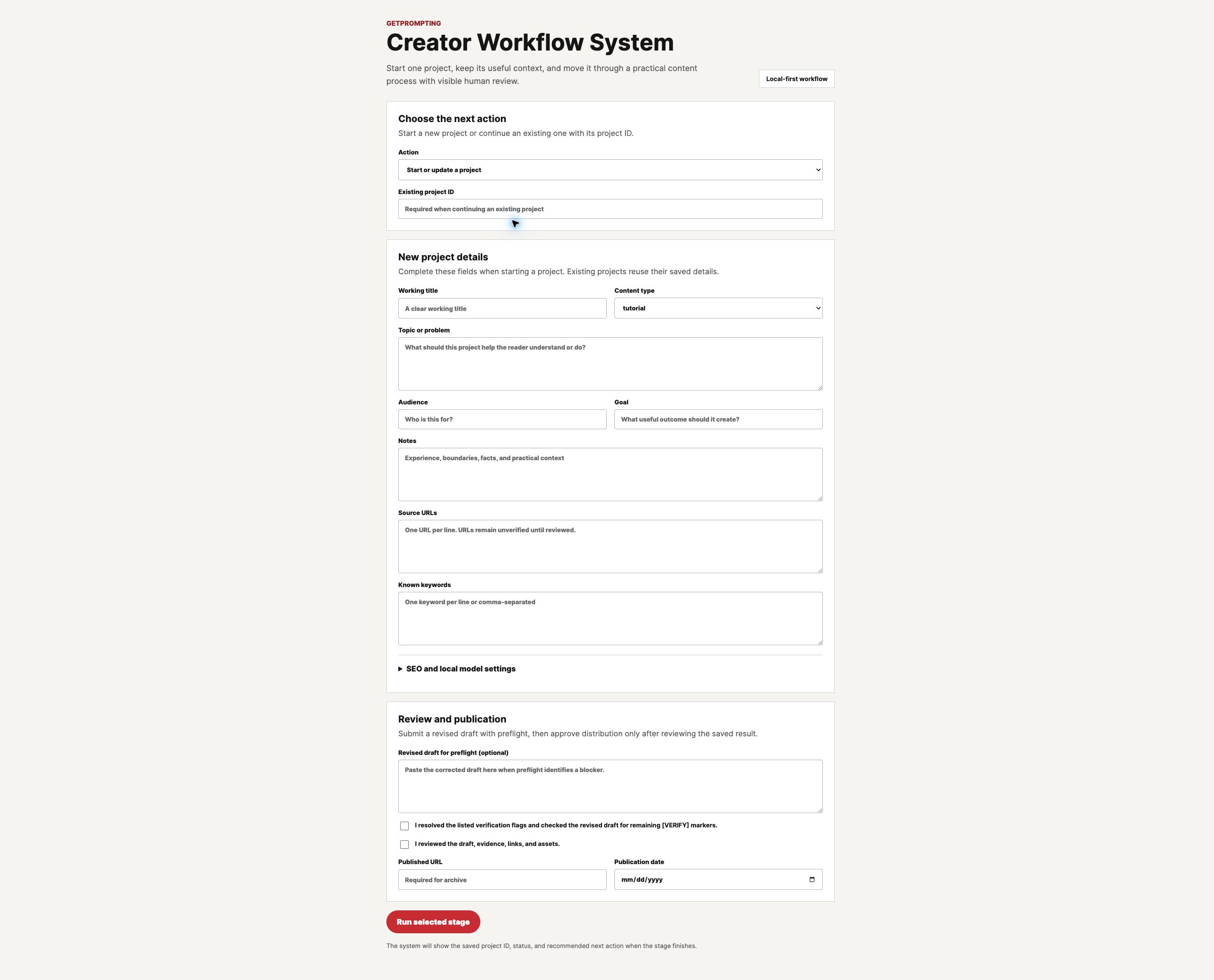
These screenshots document the included system states. They show the command surface, a blocked editorial state, a ready preflight state, and a completed distribution package.



The delivered package records 10 modular workflows, 104 nodes, 42 compiled Code nodes, 24 tests, zero credential references in the workflow exports, and five human-review SOPs.
What is included
The workflows, operating guidance, and review layer belong together.
Workflow system
- 10 modular n8n workflow exports
- Persistent project-state handling
- Research, strategy, editorial, distribution, and archive stages
Setup and operation
- Install and configuration guide
- User guide and sample inputs
- Provider and environment notes
Human review
- Five human-review SOPs
- Release checklist and test evidence
- Visible blocked, ready, and approved states
Ready to inspect after download
- Workflow exports and their visible node logic
- Install guide, user guide, sample inputs, and provider notes
- Human-review SOPs, release checklist, and test evidence
You configure and troubleshoot
- Your n8n instance, credentials, AI provider, and environment settings
- Any provider-version or infrastructure differences in your setup
- Stage-by-stage testing, maintenance, backups, and production readiness
Walkthrough
Watch the system move through the work.
See how the connected stages and review boundaries work together, then use the setup guide and sample inputs to validate the path in your own environment.
Fit check
Choose this when connected n8n execution is already the requirement.
Good fit if…
- You have a defined content process and want connected stages.
- You can run and configure n8n or have technical help.
- You want inspectable workflows rather than managed software.
- You want review gates before distribution or publication.
Probably not for you if…
- You need help deciding what the process should be.
- You want a hosted app with no setup or maintenance.
- You expect the system to browse sources or publish without review.
- You need custom implementation included in the purchase.
One-time purchase
Install a connected system you can inspect and control.
Get 10 modular n8n workflow exports, setup and user guides, sample inputs, five human-review SOPs, and release and test evidence.
Current introductory price: $39 USD. Requires n8n and a compatible AI runtime or provider. Includes a 14-day fit refund window.
Purchase details
What arrives, what you need, and what remains your responsibility.
- Included
- 10 workflow exports, setup and user guidance, sample inputs, five human-review SOPs, and release/test evidence.
- What you need
-
A compatible n8n instance, an AI runtime or provider, and the ability to configure credentials and environment-specific settings.
Affiliate disclosure: Some outbound links on GetPrompting are affiliate links. If you use the n8n Cloud link below, GetPrompting may earn a commission at no additional cost to you.
Choose your hosting: n8n Cloud is the managed-hosting option. Self-hosting n8n with Docker gives you more control, with more setup and ongoing maintenance.
- Delivery
- Digital package access after purchase. Save a clean copy before adapting workflows to your environment.
- Setup effort
- Technical. Import the workflows, connect your chosen services, adapt environment settings, and expect to troubleshoot one sample path before production use.
- Support
- Reasonable installation and access support for 14 days. Custom implementation and environment repair are not included.
- Not included
- Managed hosting, provider usage fees, custom development, source browsing, automatic publication, or claims that generated work is ready without review.
- License
- Use for one person or one business. Do not resell, redistribute, or expose the workflow package as a reusable download.
- Fit refund
- Email michael@getprompting.com within 14 days of purchase. GetPrompting will help with access or fit and refund the purchase if it is still not right.
Questions before you buy
Questions, answered plainly.
Is this hosted software?
No. You receive inspectable n8n workflow exports and operating documentation. You run and maintain the system in your environment.
Does it publish content automatically?
No. It prepares distribution drafts and keeps review states visible. A person remains responsible for approval and publication.
Does it browse the web for sources?
No. Source collection and verification remain explicit inputs and review responsibilities.
Which AI setup does it require?
You need a compatible AI runtime or provider and must connect it in n8n. The package documents supported configuration patterns; provider availability and usage costs remain separate.
Can I use it for client work?
Yes, inside one licensed business. Clients need their own license if they receive a reusable copy of the workflow package.
Is the SOP Pack or Command Center required first?
No. Those products support process maturity. This is an adjacent technical system and can be evaluated on its own.
Compare before you decide
Choose the smallest system that solves the current problem.
Use the process products when clearer manual execution or planning is the problem. Choose the technical system only when connected n8n execution is the job.
Process maturity path
Clarify how work should run and preserve the decisions that make it repeatable.
Creator SOP Pack · $19
Clear steps and review gates for manual repeated work.
See the SOP PackAI Workflow Command Center · $29
Plan, score, test, and document workflow candidates in Notion.
See the Command CenterAdjacent technical system
The SOP Pack and Command Center are not prerequisites. Choose this system when the process is defined and you are ready to configure connected n8n execution.
Compare all productsReady when the process is ready
Install a connected system you can inspect, test, and stop.
Start with one project path. Keep the human review gates. Expand only after the system behaves correctly in your environment.