
If a workflow already has the words, turning them into audio should be the boring part. The useful setup is a controlled handoff: text comes in, a managed credential calls the speech service, n8n receives an MP3, and a person listens before that file goes anywhere public.
Disclosure: This article includes an ElevenLabs affiliate link. If you sign up through it, GetPrompting may earn a commission at no extra cost to you. That relationship does not determine the recommendation.
If the hosted route fits your workflow, you can try ElevenLabs. The rest of this article focuses on the setup, test path, and review boundary.
That is more useful than it sounds. A clean text-to-speech step can turn a short product update into an audio version for a busy customer, give a meeting recap a listenable first pass, or create a voice track for a small demo without reopening an editor every time. The trick is to automate the repeatable part without pretending a generated voice is ready for every audience by default.
For the broader tool decision, start with the ElevenLabs review. This ElevenLabs with n8n setup keeps text-to-speech as a repeatable step that produces an audio file someone can actually review and use.
The workflow you are building
Text input → managed API credential → ElevenLabs request → binary MP3 → review or storage
That shape matters more than a clever prompt. It gives you one predictable place to change the voice, model, output format, or destination later without hiding secrets in a Set node or a copied workflow export.
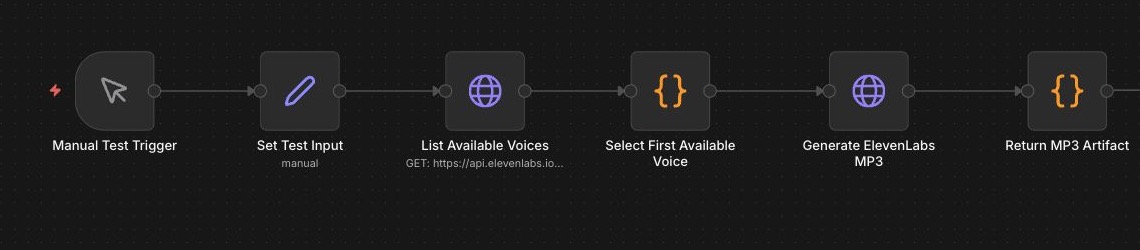
This first version is deliberately small: it chooses a voice, creates an MP3, and returns the file. That is enough to test credentials, request shape, binary handling, and the audio itself before you add more moving parts.
Start with a small test sentence
Use a Manual Trigger and a Set or Edit Fields node. Keep the first input short so a broken request does not burn through credits while you are still checking the plumbing.
A useful workflow begins with a repeatable task, a clear input, and a defined result. Automation can remove busywork, but a person still decides whether the result is ready to publish.Good places to use this in a real workflow
Voiceovers are the obvious use case, but they are not the only one. The stronger pattern is a workflow that already has useful text and needs an audio version for a specific reader or moment.
- Product and feature demos: turn approved release notes or a short demo script into a rough narration track before recording the final video.
- Meeting recap audio: have a transcript or a reviewed summary produce a private MP3 for someone who would rather listen on a walk than reread the notes.
- Accessibility alternatives: create an audio companion for a guide, onboarding email, or knowledge-base update after the source text has been edited.
- Internal training: pair a short SOP update with a spoken overview so a new teammate gets the context before opening the full document.
- Creative prototypes: try pacing, tone, and timing for a podcast intro, explainer, character read, or game concept before bringing in a human performer.
None of those need an autonomous publishing pipeline. In fact, most are better when the workflow creates a draft artifact, labels what it is for, and stops at a human checkpoint.
Set up the ElevenLabs request in n8n
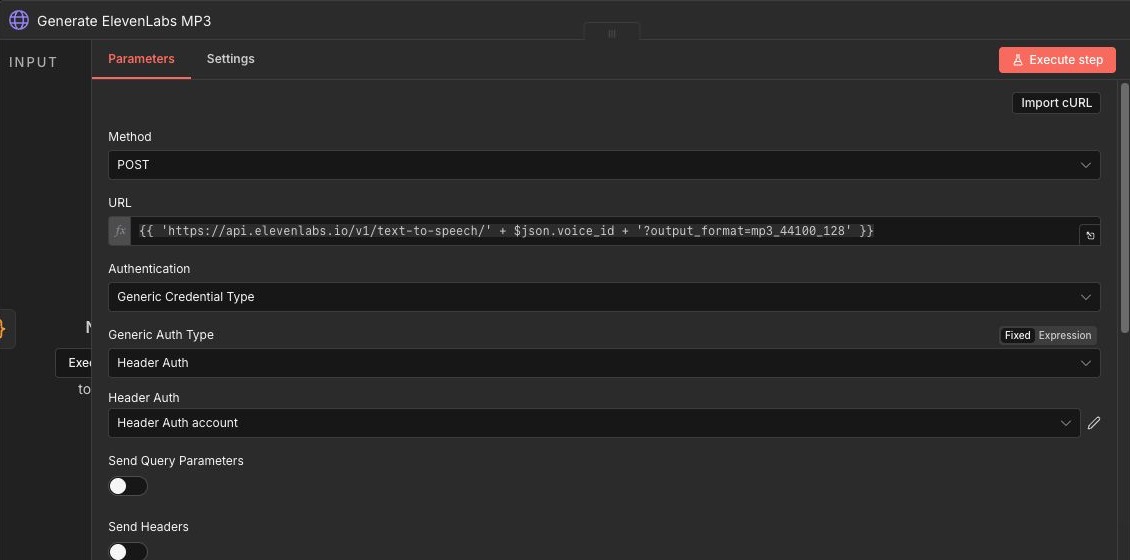
ElevenLabs documents its speech endpoint as POST /v1/text-to-speech/{voice_id}. The API key belongs in the literal xi-api-key header, which is why the clean n8n setup is a reusable Header Auth credential rather than a value pasted into the workflow.
- Method:
POST - URL:
https://api.elevenlabs.io/v1/text-to-speech/{voice_id} - Authentication: a managed Header Auth credential
- Header name in that credential:
xi-api-key - Body type: JSON
- Response: File/Binary, not JSON
{
  "text": "{{$json.text}}",
  "model_id": "eleven_flash_v2_5"
}
Use a voice ID you have verified in your own account. Models and output options are configuration choices, not permanent copy-and-paste facts. ElevenLabs’ Create speech documentation lists the current endpoint, request fields, and output formats; its authentication documentation covers the API key header.
Change the voice without rebuilding the workflow
Keep the voice ID out of the HTTP Request node’s hard-coded URL. Put it in an earlier Edit Fields node instead, then use an expression in the request URL:
https://api.elevenlabs.io/v1/text-to-speech/{{$json.voice_id}}Now the request node stays the same while you change only the input value. The simplest first version is a voice_id field beside your text field. A better version keeps a small approved list with a human name, a voice ID, and a use-case note such as “clear explainer,” “slower training read,” or “warm internal recap.” That is much easier to maintain than having different HTTP Request nodes for every voice.
{
  "voice_id": "your-approved-voice-id",
  "voice_label": "clear-explainer",
  "text": "A short script you can listen to before committing to a longer run."
}
Audition a few voices without rerunning the whole workflow
There are two different kinds of “not rerunning” here. You can avoid rerunning the lookup, formatting, and other upstream steps. You cannot create a fresh sample from ElevenLabs without making a fresh generation request, so each new MP3 may still use account credits.
In the n8n editor, run the lightweight voice-lookup or Edit Fields node once, inspect that output, and pin the data for manual testing. n8n’s pinned-data guidance is meant for reusing stable test input in the editor. After that, change the selected voice_id and use Test step on the generation node. The node receives the pinned upstream shape, so you are testing the part that changed instead of starting from the Manual Trigger again.
For a quick three-voice audition, make the script intentionally short and pass one item per candidate voice into the generation step. Name the resulting files with the label so you can compare them later:
voice_label: clear-explainer
filename: voice-test-clear-explainer.mp3

voice_label: warm-recap
filename: voice-test-warm-recap.mp3

voice_label: energetic-demo
filename: voice-test-energetic-demo.mp3
Listen to those three files side by side before you run a longer script. That small comparison catches a common mistake: choosing a voice because it sounds impressive in isolation, then discovering it is too fast, too bright, or too theatrical for the actual job.
Tell n8n to keep the result as audio
The successful response is an audio file. If the HTTP Request node expects JSON, the next node will have nothing useful to work with. Set the response to File/Binary, then pass that binary property to storage, an approval step, or a download node.
For a normal MP3 request, ElevenLabs documents mp3_44100_128 as an output format. Some higher-quality formats have plan requirements, so treat quality settings as an account check, not a promise you make in the workflow.
Four small choices that save headaches later
Keep a voice profile in the input. Do not make every node guess what “friendly” means. Pass a simple field such as voice_profile, audience, or use_case from the trigger. Even if the first version only supports one voice, this gives you a clean way to add approved choices later.
Keep the script and the filename separate. A useful filename tells you what you are listening to after it leaves n8n: product-demo-draft-2026-09-16.mp3 is better than an opaque binary property. Use an ID or timestamp so retries do not quietly overwrite an earlier version.
Measure the script before generation. Long input is where speed, cost, and review fatigue start to creep in. Add a character-count field and either stop above a limit or route the item to a “needs split” branch. A two-minute narrated recap is not a small test anymore.
Make duplicate handling intentional. If the same trigger can arrive twice, carry a request ID through the workflow and write it beside the output. That gives you a way to find a prior file before generating another one.
The more useful version: a voice review queue
Once the small test works, I would not jump straight to “publish to every channel.” I would build a review queue. It gives you a practical middle ground: fast generation when the text is ready, but a visible place to inspect the output before a public or customer-facing action happens.
Approved text → Normalize fields → Check length and request ID → Pick an approved voice → Generate MP3 → Save draft artifact → Create review item → Human approves or requests changes → Deliver to the chosen destination
The first five stages are mechanical. The last two are where judgment belongs. A demo script might need a different pace than an internal recap; an unfamiliar product name may need a pronunciation note; a good voice for a casual explainer may be wrong for an accessibility recording. A queue keeps those decisions visible instead of burying them in a successful execution log.
Use this as the first input shape
{
  "request_id": "demo-2026-09-16-01",
  "text": "The new workflow creates a draft audio file for review.",
  "voice_profile": "clear-explainer",
  "use_case": "product-demo",
  "review_required": true,
  "destination": "draft-library"
}
That is enough information for n8n to name the file, choose from a small approved voice list, and route the MP3 to the right review place without exposing an API key or inventing a destination. Start with a manual trigger while you are learning. Move the same shape to a webhook, form, database event, or content system only after the review path makes sense.
For this article, the advanced queue is a recommended build pattern, not a claim that GetPrompting has automated publishing from it. The verified local test is the smaller request path shown above: list voices, generate one MP3, and return the artifact.
Listen before you automate the next action
A generated MP3 is an artifact, not an approval. Listen for awkward emphasis, technical-name pronunciation, pacing, clipping, and anything that changes the meaning of the script. That matters even more for customer-facing demos, meeting summaries, or narration built from AI-generated text.
In my local test, the workflow listed available voices, sent a short script through the managed credential, and returned a 12.2-second MP3. You can listen to that narrow proof-of-path sample here:
Three failure points to check first
- The credential label is not the header name. “ElevenLabs API key” can be a helpful label, but n8n must send
xi-api-key. - The response mode is wrong. Choose File/Binary so the MP3 reaches the next node as an artifact.
- Retries are unbounded. Speech generation can consume credits and create duplicate files. Make retries explicit and log enough context to see what happened.
What a useful test looks like
My local proof-of-path run used a short script, listed the available voices, selected one, and returned a 12.2-second MP3. The expected result was a playable binary audio file with no credential exposed in the workflow canvas. The actual result was a 196,484-byte MP3 at 44.1 kHz, 128 kbps mono.
That is a successful request-path test, not proof that every voice, script length, pronunciation, or account setting will sound right. The next action was to listen to the artifact and keep the setup at a review boundary rather than attach an automatic publishing step.
What this test did not prove
This was not a benchmark. I did not test a broad voice set, long-form narration, concurrent requests, account-wide quotas, or latency consistency across multiple runs. If your workflow is headed toward customer-facing delivery, test the exact voice, script length, pronunciation list, and failure behavior you plan to use before you automate the destination.
Hosted voice versus local voice
ElevenLabs is useful when you want a direct hosted API path and do not want to operate voice inference yourself. A local setup is the better fit when keeping inference on your own machine matters more than avoiding runtime maintenance. Neither approach removes the review step.
If you are designing a larger system around this step, the AI workflows guide is the right wider context. For adjacent examples you can take apart, browse the free n8n workflow library.
Frequently asked questions
Can n8n save ElevenLabs audio as an MP3?
Yes. Configure the HTTP Request node to receive a File/Binary response, then send that binary output to the review or storage step you choose.
Should I put my ElevenLabs API key in a Set node?
No. Store it in an n8n credential and reference that credential from the HTTP Request node. That keeps the secret out of screenshots, exports, and ordinary node data.
Can this publish audio automatically?
It can, but this tutorial deliberately stops at a review boundary. Add the next action only after you have decided how a person will check the result and how duplicate generations will be handled.
The takeaway
Use ElevenLabs with n8n when voice output is one clear step in an already useful workflow. Keep the credential managed, keep the response binary, give each request enough context to be reviewable, and make listening part of the system instead of a hope at the end.
Free AI Workflow Kit
Map the workflow before you start wiring nodes.
Define the input, output, review step, and failure condition with the workflow tools inside the combined GetPrompting Starter System.
Move from example to working system
Test the boundary before you automate the whole process.
Inspect a working n8n example first. If the workflow is fragile, customer-facing, or expensive to get wrong, ask Michael to review it.