
This guide shows the full local Qwen TTS with n8n path: reach a local service from Docker, return a WAV file, and keep a human review step before anything leaves the workflow. The goal is not just “send text to Qwen.” It is a small system you can inspect when the handoff works and troubleshoot when it does not.
Tested setup: I’m running Qwen through an MLX-compatible local service on an Apple-silicon Mac, with n8n in Docker. The workflow pattern transfers, but your runtime, endpoint, and network path may differ, so use the current Qwen3-TTS documentation and n8n HTTP Request documentation to match your own hardware.
Important: the /api/v1/custom-voice/generate route below belongs to the tested local service wrapper. It is not an official universal Qwen endpoint. Check your chosen runtime’s current documentation before copying the route, voice name, or request body.
The local Qwen TTS with n8n workflow in one line
n8n container → host bridge → local Qwen TTS service → WAV artifact → human review or storage
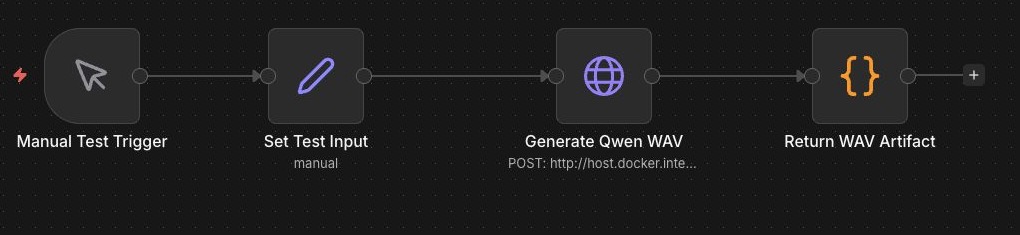
The workflow has four nodes: Manual Test Trigger, Set Test Input, Generate Qwen WAV, and Return WAV Artifact. That is on purpose. A local runtime already brings enough moving parts without adding automatic publishing, notifications, or a queue on the first test.
Choose where Qwen will run
For a first build, keep the model runtime on the same machine that runs Docker Desktop and n8n. That is the path tested here: a Qwen-compatible MLX service runs on the Mac host, while n8n stays in its local Docker container.
That arrangement is easier to debug than splitting the first version across a NAS, a VPS, or another computer. The model service can listen locally, n8n crosses one deliberate host bridge, and you have one place to look when an audio request fails.
An always-on Mac mini or home server can be a sensible later host if you want the workflow available without opening a laptop. Treat that as an operations decision, not a copy-and-paste upgrade: use a private network or VPN, add authentication where the service supports it, and do not expose a local TTS port directly to the public internet.
Start with the runtime, not the workflow
Qwen3-TTS is the model family. The HTTP route n8n calls depends on the local runtime or wrapper you choose. In this build, a Qwen-compatible MLX service exposes a small local API on port 7810. Another runtime may use a different install command, route, voice list, or response format.
That distinction matters. Install and start your chosen Qwen runtime according to its current documentation, then learn its health route and generate route before touching n8n. Do not assume every Qwen example on the internet exposes the same API.
Verify the service from the host
The Docker mistake that catches people
When n8n runs in a container, 127.0.0.1 points back to that container, not to the Mac running your local TTS server. My first attempt used the local loopback address and failed with ECONNREFUSED.
On Docker Desktop, the working bridge was host.docker.internal. In this test, the request went to:
http://host.docker.internal:7810/api/v1/custom-voice/generateYour service may use a different port or route. Treat the address as a pattern to verify, not a value to copy blindly.
Start with a health endpoint so you know whether the problem is the model runtime or the workflow:
curl -fsS http://127.0.0.1:7810/health{"status":"healthy","backend":"mlx"}If that local check fails, n8n cannot fix it. Get the service healthy first, then make one direct generation request with a short, harmless sentence. Only after the service returns playable audio should you introduce the n8n node.
Give n8n a small, inspectable input
Create a workflow with a Manual Trigger and a Set node before the HTTP Request node. In the Set node, add four fields: text, speaker, instruct, and output_filename. This separates the words you want spoken from the delivery instruction and makes a bad result easier to reproduce.
For example, keep the text short on the first run, choose one speaker supported by your runtime, and use a plain instruction such as “clear, friendly, measured delivery.” A short sample tells you more quickly whether the bridge and binary output work than a five-minute script will.
Configure Qwen TTS in n8n
The local service used in this test accepts JSON and returns WAV audio. The HTTP Request node uses POST, sends a JSON body, and receives the result as a file/binary response.
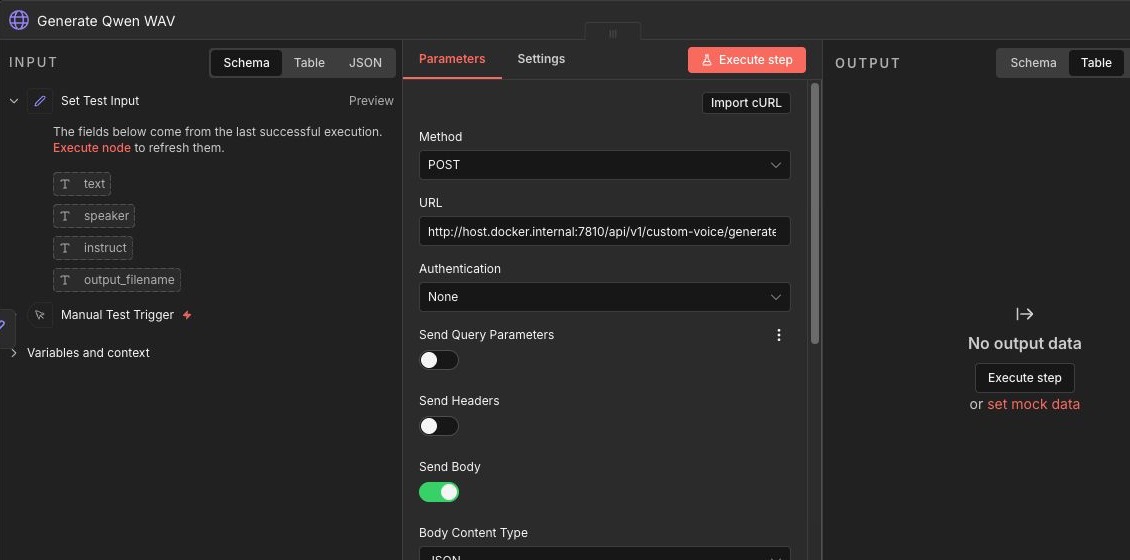
{
  "text": "{{$json.text}}",
  "language": "English",
  "speaker": "{{$json.speaker}}",
  "instruct": "{{$json.instruct}}",
  "speed": 2.0,
  "response_format": "wav"
}
Use your own service contract here. Qwen supports different local runtimes and configurations, so the exact endpoint, speaker names, and fields can differ. The point is to keep the request shape in one node and keep the binary response available for the next step.
Dial in pace with short comparison runs
The first sample from this workflow used a speed value of 1.04. It worked, but it felt too leisurely for a short status update. The replacement example below uses 2.0 with a shorter instruction and lands at 6.56 seconds.
Do not guess at a whole narration. Keep the same short input, adjust only speed, and compare two or three files side by side. If your n8n version supports testing a single node with pinned input, use that. Otherwise keep a small manual-test workflow like this one so you are not rerunning unrelated downstream steps just to hear a different pace.
A larger number is not automatically better. Push it too far and names, pauses, and the end of a sentence can start to feel rushed. The right setting depends on the speaker, the model runtime, and what the listener needs to do with the audio.
Set the response to a file
In n8n, configure the HTTP Request node to receive a file or binary response rather than trying to treat the returned audio as JSON. The next step can then save the binary property, hand it to a review queue, or return it as a download. Keep a filename in the workflow data so each test is easy to identify.
Do not add an automatic publishing step yet. First prove that the node returns a real audio file, with a duration you can play and a name you can trace back to the input.
What the local test proved
The corrected host-bridge workflow returned a playable WAV file. The replacement sample below is 6.56 seconds, PCM, 24 kHz, and mono. It lets you hear the output and decide whether the pace fits the job.
The earlier loopback failure was informative. It did not quietly return empty audio; it failed with ECONNREFUSED. That is what you want from a local workflow: clear evidence of where the handoff broke.
Where local Qwen TTS makes sense
This path is a good fit when you want more control over the runtime and prefer to keep text on your own machine. It can work well for internal summaries, private prototypes, accessibility companions, or creative experiments where you are comfortable maintaining the service.
- Meeting-recap audio: turn an approved internal summary into a short listenable handoff for someone who is walking, driving, or moving between tasks.
- Training and demo drafts: make a review copy of a product walkthrough before spending time on a polished recording or video edit.
- Accessibility companions: create an audio version of a guide, checklist, or release note after a person checks the wording.
- Creative prototyping: test pacing, narration style, or character direction for a game, explainer, or concept without sending each draft to a hosted provider.
- Internal workflow receipts: attach a concise spoken status update to a completed automation when a team prefers audio to another dashboard notification.
None of those require automatic public publishing. Keep the boundary simple: automation prepares the artifact; a person decides whether it is accurate, appropriate, and ready to leave the system.
The tradeoff is maintenance. You own the model files, runtime, local endpoint, Docker bridge, updates, logs, and recovery plan. “Local” also is not a magic privacy label. Check the bind address, logs, model downloads, and anything else connected to the machine before making a stronger claim.
Keep the review step
A local audio file is still an artifact, not an approval. Listen for names, acronyms, pacing, and awkward transitions before you attach it to a customer update, public video, or training asset. If you later add storage or delivery, use a request ID and a visible review status so a retry does not create mystery duplicates.
For the broader workflow design, read the AI Workflows guide. For more n8n examples you can take apart, browse the free n8n workflow library. If managed infrastructure matters more than operating a local runtime, the ElevenLabs with n8n tutorial is the better hosted comparison.
What this test did not prove
This was one verified local run, not a broad test matrix. It does not establish latency, voice quality, or hardware fit on another machine. It also does not grant rights to clone a person’s voice or reuse source material without permission. Check the current Qwen3-TTS repository, the relevant model card, and n8n’s HTTP Request documentation before adapting the setup.
Frequently asked questions
Why does localhost fail from n8n in Docker?
Inside the container, localhost points to the container itself. On Docker Desktop, use the host bridge when the TTS service runs on your Mac.
Can n8n save local Qwen audio?
Yes. Configure the request node to receive File/Binary output, then send that binary property to a reviewed storage or download step.
Will this exact Qwen endpoint work on my machine?
Not necessarily. The route in this guide belongs to the tested local MLX service wrapper. Use it as an architecture example, then follow the API contract for the runtime you actually host.
Is local Qwen TTS automatically private?
No. It can reduce hosted-provider exposure, but you still need to check networking, logs, downloads, and the surrounding runtime.
The takeaway
Local Qwen TTS with n8n makes sense when the runtime itself is part of the workflow you want to control. Test the health endpoint first, use the correct Docker bridge, keep audio binary, and let a person decide what happens after the file exists.
Free Local AI Setup Kit
Choose a local AI setup that fits your computer and the job.
Use the local setup checklist, model decision path, and workflow boundaries inside the combined GetPrompting Starter System.
Move from example to working system
Test the boundary before you automate the whole process.
Inspect a working n8n example first. If the workflow is fragile, customer-facing, or expensive to get wrong, ask Michael to review it.