
Some n8n workflows get better when you let a paid API do the job AI should not guess at.
SEO keyword research is a good example.
An AI model can help you turn a rough topic into better seed ideas. It can help you compare angles, summarize intent, and prepare an article brief. But it cannot magically know current search volume, keyword difficulty, CPC, or what the live SERP looks like unless you connect it to a real data source.
That is the lesson behind this workflow. The point is not that every beginner n8n workflow needs paid APIs. Most do not. The point is that paid APIs are useful when the workflow needs outside data that changes the decision.
The same idea applies to competitor monitoring. This competitor tracking workflow guide shows when to use structured data, public sources, snapshots, and review tables instead of asking AI to invent market movement.
This guide walks through a free n8n SEO keyword research workflow that uses OpenRouter for seed expansion, DataForSEO for keyword data, and Google Sheets for the final review table. The workflow is free to download, but the full run requires your own paid API accounts.
This workflow uses paid data intentionally, which makes cost tracking part of the design. If you are deciding where paid APIs belong, use the AI workflow cost and privacy framework before adding more calls.
If you are newer to n8n, start with What Is n8n? or the Free n8n Workflow Library. If you want the bigger strategy first, the AI workflows guide explains why inputs, outputs, and review gates matter more than the tool choice.
Quick Copy
Paid API Workflow Preflight
Use this before adding a paid API to an n8n workflow. It keeps the decision practical instead of shiny.
Before I add a paid API to this workflow, help me decide if it is worth it.

Workflow goal:

Decision the API data will improve:

Data I cannot reliably get from AI alone:

API provider being considered:

Expected cost per test run:

Expected cost at normal usage:

Failure mode if the API is unavailable:

Human review step:

Return:
1. Whether the paid API is justified
2. What data it adds that AI should not guess
3. How to cap cost during testing
4. What fallback path the workflow needs
5. What the human should review before acting
What This Workflow Builds
The workflow takes a rough content topic and returns a structured keyword research report. It is designed for people who want a repeatable research step before choosing a blog topic, outline, or content cluster angle.
The flow starts with a main orchestrator workflow. That orchestrator holds the starting research request, calls the helper workflows in order, and passes the cleaned data into the final save step. The request includes the seed keyword, audience, content goal, location, language, and research mode.
From there, the workflow does four jobs:
- Normalize the input so every run starts with the same basic structure.
- Use AI to expand a rough topic into better seed keywords.
- Use DataForSEO to pull keyword data that should not be guessed.
- Clean, dedupe, and score the rows before saving them to Google Sheets.
That separation matters. AI is doing the creative expansion work. The paid API is doing the market-data work. The code nodes are doing the cleanup work. The human still decides what is worth writing.
Why Paid APIs Can Improve an AI Workflow
A lot of AI workflow examples stop at “ask the model for ideas.” That is fine when the output is a brainstorm. It is weaker when the output is supposed to support a business decision.
Keyword research is a decision-support job. If you are choosing what to write, you probably want to know whether people search for the topic, how competitive it looks, whether there is commercial intent, and whether the idea fits your current authority level.
That is where a paid API can earn its place. DataForSEO’s Keyword Data API is built around keyword analysis data such as search volume, CPC, competition, trend signals, Google/Bing sources, and related SEO metrics. I chose it for this workflow because it gives n8n a direct API source for keyword data without asking an AI model to guess search demand. OpenRouter, meanwhile, gives the workflow a flexible way to call different AI models through one provider. n8n holds the process together so the research step can be run again with the same structure.
The practical rule is simple: use AI for language and reasoning, use APIs for data the model should not invent, and use human review for judgment.
The Workflow Structure
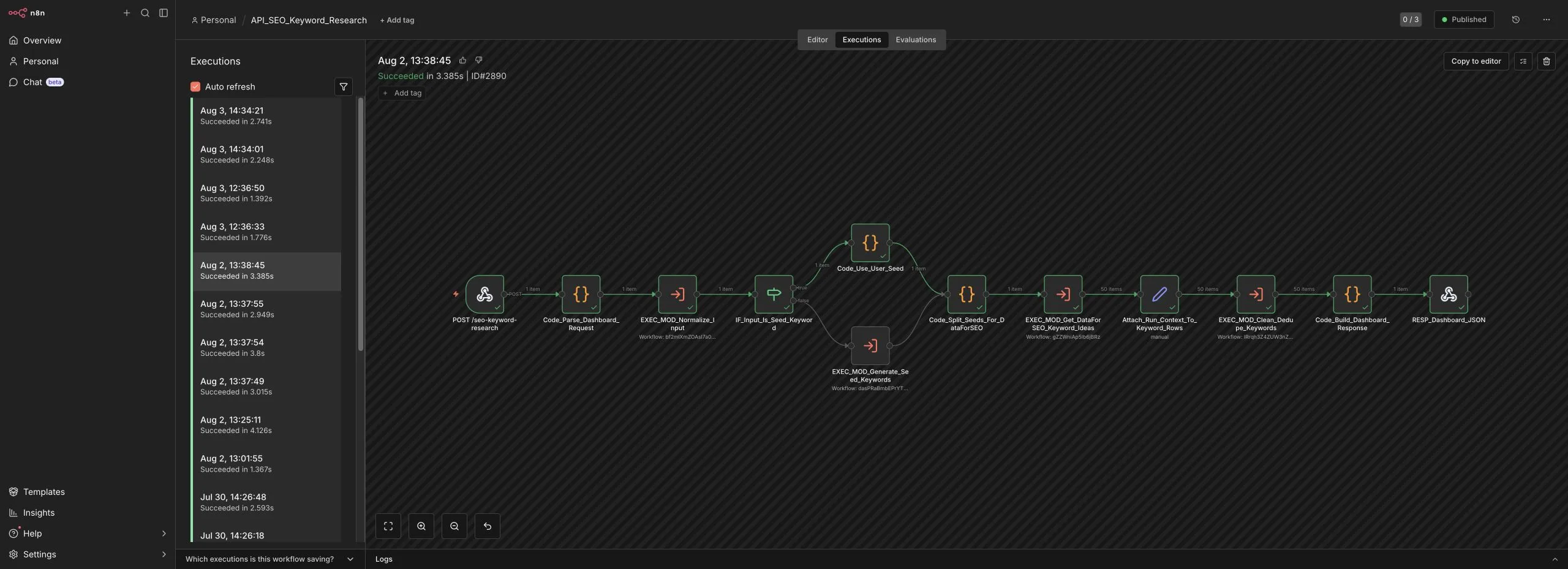
This is a modular n8n kit, not one giant canvas. The main workflow is an orchestrator, and it calls five helper workflows. That makes the system easier to test, easier to explain, and easier to change later.
That kind of modular workflow also needs clear handoff notes. If you are packaging a workflow like this for someone else, use this guide to document an n8n workflow before you share it so the modules, credentials, setup steps, and review points are not trapped in your head.
The main workflow is called ORCH_SEO_Keyword_Data_Collector. It prepares the request, sends work to the helper modules, saves the clean rows, and returns a short run summary.
The modules are intentionally single-purpose:
MOD_SEO_Normalize_Inputprepares the request.MOD_SEO_Generate_Seed_Keywordsuses OpenRouter to expand the topic.MOD_SEO_Get_DataForSEO_Keyword_Ideaspulls keyword data.MOD_SEO_Clean_Dedupe_Keywordscleans the rows before scoring.MOD_SEO_Save_To_Google_Sheetssaves the clean keyword table for human review.
n8n supports this kind of modular pattern through sub-workflow execution. In plain English, the main workflow can call another workflow and pass data into it. That is useful when a step is reusable or when one canvas is getting too hard to understand.
For SEO research, modularity gives you a cleaner path. You can improve seed generation without touching the DataForSEO node. You can change dedupe rules without touching the save step. You can swap Google Sheets for Airtable or Notion without rebuilding the whole thing.
This is why this workflow has more modules than the simpler beginner workflows in the library. The point is not complexity for its own sake. The point is showing how orchestration works once a workflow has different jobs that deserve their own boundaries.
Step 1: Start With a Clear Research Request
The workflow expects more than a random keyword. A better request includes the topic, the audience, and the reason you are researching it.
Here is the shape used in the sample input:
{
  "niche_or_seed_keyword": "AI workflow preflight checklist",
  "audience": "solo creators and small business owners building practical AI workflows",
  "content_goal": "Find article topics that have clear search intent and can support a practical tutorial",
  "location_code": 2840,
  "language_code": "en",
  "research_mode": "keyword_research",
  "confidence_top_n": 10
}
This is the same habit I keep coming back to across GetPrompting: clean inputs make better workflows. If the goal is vague, the output will look confident but drift. If the audience is missing, the workflow has no reason to prefer one keyword over another.
If you want to tighten that habit before building, use the AI Workflow Preflight Checker or the guide on cleaning messy inputs before using AI.
Step 2: Let AI Expand the Seed, Not Choose the Strategy
The AI step expands the topic into seed keyword ideas. That is a useful job for a model because it can rephrase the topic, surface adjacent wording, and avoid making the workflow depend on one exact phrase.
But this is also where the boundary matters. The model is not the source of truth for search demand. It is just helping generate better starting points for the data step.
In this workflow, OpenRouter is used because it lets you route requests through different models without redesigning the whole workflow. If you prefer OpenAI, Claude, Gemini, Ollama, or another n8n-supported model, you can swap this step. The important thing is preserving the contract: rough topic in, clean seed list out.
Step 3: Pull Real Keyword Data With DataForSEO
The DataForSEO module takes the seed keywords and returns keyword data. This is the part that makes the workflow different from a simple AI brainstorm.
DataForSEO is a pay-as-you-go SEO data provider. Instead of logging into a keyword tool by hand, you send a structured API request and get machine-readable keyword rows back. That makes it a good teaching fit for this workflow: the AI step can expand the seed idea, DataForSEO can return real keyword metrics, and n8n can clean the result into something a human can review.
The workflow is designed to work with fields such as search volume, CPC, competition, competition level, keyword difficulty, intent, SERP result count, and related keyword metrics. You should treat those as planning signals, not orders.
For a small site, the best keyword is not always the keyword with the biggest volume. A lower-volume topic with cleaner intent and lower competition can be much more useful than a broad topic where every established site is already fighting.
That is why the workflow does not stop at “here are keywords.” It prepares the data for review.
Step 4: Clean and Score the Rows
Raw keyword data can get noisy fast. You may get duplicates, broad phrases, weak-fit keywords, or terms that look attractive because they have volume but do not match the audience.
The cleanup module normalizes rows and removes obvious duplicates. The saved table then gives you practical fields that are easier to review than raw API output.
Those scores are not meant to replace judgment. They are meant to make the first review pass easier. When I use this kind of workflow, I still ask a human question at the end: “Would this article actually help the reader I want to serve?”
That question keeps SEO from turning into spreadsheet theater.
What the Final Output Looks Like
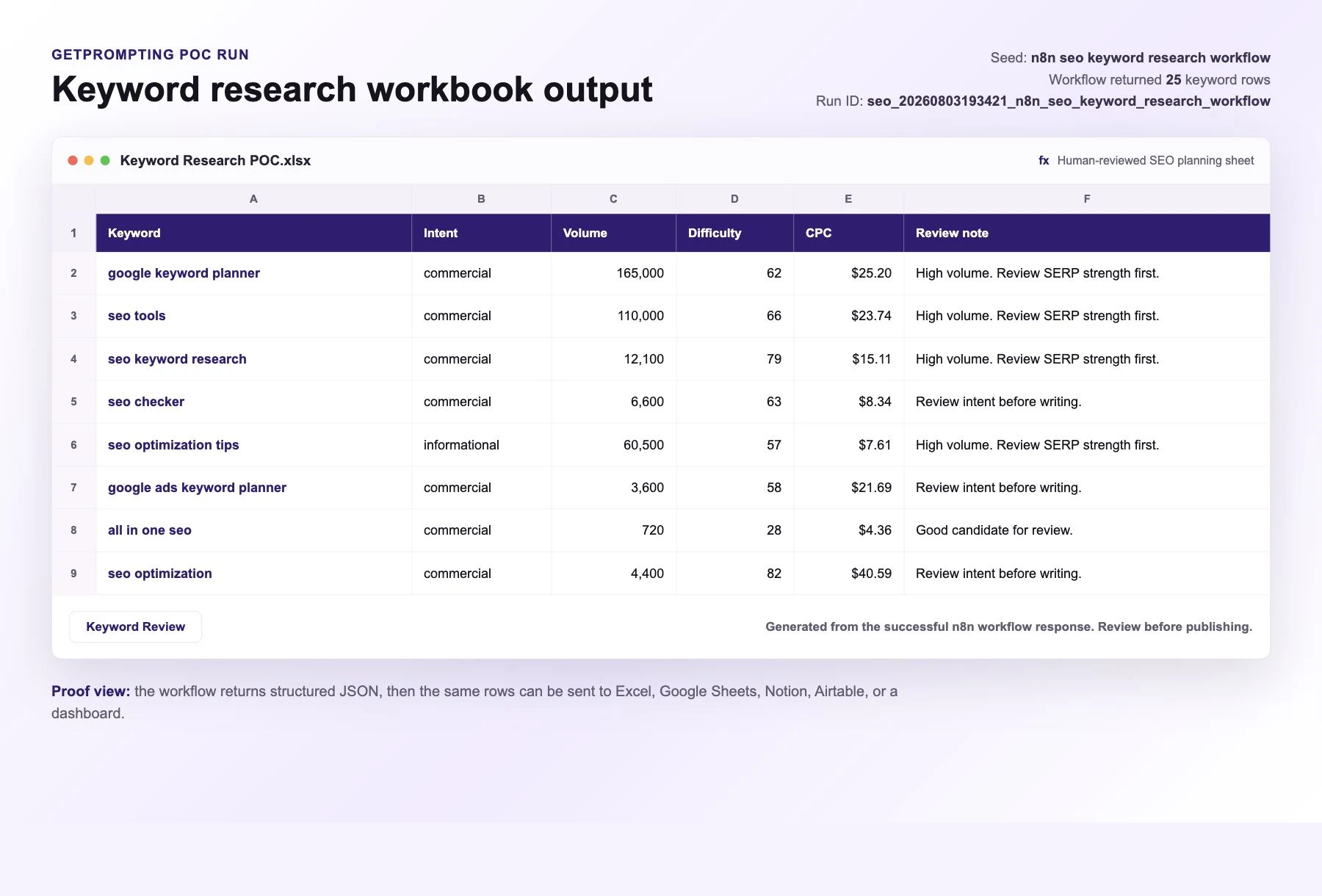
The final saved output is a keyword table. The orchestrator also returns a short summary so you know the run completed and can quickly check what came back.
A shortened output might include a row like this:
{
  "keyword": "ai workflow checklist",
  "main_intent": "informational",
  "search_volume": 90,
  "keyword_difficulty": 18,
  "cpc": 6.25,
  "competition_level": "LOW",
  "relevance_score": 82,
  "content_score": 86,
  "confidence_score": 78
}
That is enough to support a better writing decision. It does not tell you the article is guaranteed to rank. It tells you the topic has signals worth considering.
Proof of Concept Run
I ran the full orchestrator locally with the module chain enabled. The run completed successfully: DataForSEO returned 800 raw keyword rows, the cleanup module reduced that to 469 clean rows, the Google Sheets module saved those rows, and the orchestrator returned a 1-item summary.
The point of saving the output is not to pretend a spreadsheet makes the decision for you. It gives you a review surface. You can scan the terms, filter the rows, compare intent, and challenge the data before you decide what deserves to become an article.
Cost Control Matters
Because this workflow uses paid APIs, the setup needs a cost-control mindset from the beginning.
Start small. Use one seed topic. Limit the number of generated seed keywords. Avoid broad research runs until you understand your cost per test. As of August 2026, DataForSEO describes its pricing as pay-as-you-go with a $50 minimum payment amount. For Google Ads keyword data, the published pricing is currently listed around $0.06 per standard task or $0.09 per live task for up to 1,000 keywords, but the real cost depends on the endpoint, mode, priority, and parameters you choose. Always check the current DataForSEO Google Ads API pricing and your OpenRouter model pricing before running broad tests.
This is also why the workflow is free, but clearly labeled as a paid-API example. It should teach the architecture without hiding the operating cost.
Affiliate disclosure: If you use the n8n Cloud link below, GetPrompting may earn a commission at no additional cost to you.
Need somewhere to run this workflow? If you do not already have an n8n workspace, n8n Cloud is the easiest hosted option. Prefer self-hosting or local testing? Use the Docker setup guide.
How to Install the Workflow
You can download the full workflow kit from GitHub:
Open the Paid API SEO Keyword Research workflow on GitHub
Import every JSON file in the workflows/ folder. This matters because the orchestrator calls five helper workflows.
orch-seo-keyword-data-collector.jsonmod-seo-normalize-input.jsonmod-seo-generate-seed-keywords.jsonmod-seo-get-dataforseo-keyword-ideas.jsonmod-seo-clean-dedupe-keywords.jsonmod-seo-save-to-google-sheets.json
After import, create your own OpenRouter, DataForSEO, and Google Sheets credentials inside n8n. The public export does not include my credentials, API keys, OAuth tokens, execution logs, private spreadsheet IDs, or private account data.
Then open the Google Sheets save module, choose your own spreadsheet, and run the orchestrator. Start with one narrow test before wiring the output into anything else.
What This Teaches
This workflow teaches a different lesson than the earlier free workflows in the library.
The earlier workflows are mostly about shaping messy text, writing predictable prompts, and keeping outputs reviewable. This one adds an outside data layer. That changes the design problem.
Once a paid API enters the workflow, you have to think about cost, rate limits, authentication, fallback behavior, data quality, and whether the data actually improves the decision. Once a workflow also saves into another tool, you have one more thing to test: the final handoff.
That is a useful step forward. It is closer to how real workflows behave once they leave the playground.
Suggested Improvements
Once the base workflow is running, the best improvements are practical rather than flashy.
You could save every run to Google Sheets so you build a reusable keyword database. You could add a manual approval step before any article brief is created. You could connect the output to an editorial workflow, but only after the report has a clear review step. You could also add a budget guard that stops the workflow if a request tries to generate too many seeds at once.
If you are building a larger content system, this workflow pairs naturally with the Creator Workflow System for n8n. If you are still learning, keep it simpler: run one research request, inspect the output, and decide whether the paid data changed what you would write.
FAQ
Is this workflow free?
The workflow kit is free to download and edit. Running the full workflow requires your own paid API accounts for DataForSEO and OpenRouter, plus your own Google Sheets credential if you want to use the included save module.
Does the workflow include API keys?
No. The public workflow exports do not include private API keys, OAuth tokens, n8n credential objects, execution logs, private spreadsheet IDs, or private account data. You must connect your own credentials after importing the workflows.
Can I use a different AI provider?
Yes. OpenRouter is used in the starter version because it makes model swapping easier, but you can replace that step with another n8n-supported AI provider or a local model if it returns a clean seed list.
Why is the workflow modular?
The workflow is modular because each step has a different job. Input cleanup, AI seed generation, paid keyword data, row cleanup, and Google Sheets saving are easier to test and modify when they are not all packed into one canvas.
Should beginners start with this workflow?
If you are brand new to n8n, start with one of the simpler workflows in the free library first. Use this workflow when you are ready to learn how paid APIs can add real data to an automation.
Final Thought
The best paid API workflow is not the one with the most expensive data source. It is the one where the data improves a real decision.
For SEO, that means using AI to help frame the research, using DataForSEO to bring in real keyword signals, and keeping a human in the loop before deciding what deserves to be written.
Download the workflow kit on GitHub or browse the full Free n8n Workflow Library.
Next step
Ready to adapt this workflow?
Use the guide as a reference build, then decide whether to test it yourself or map the safer version for your own stack.
Open the GitHub repository, inspect the workflow export, and test one change at a time before trusting it with real work.
Open GitHub repoIf this needs to fit your CRM, content process, reporting setup, or local tools, a focused review can surface weak spots before you rebuild.
Ask Michael to review it