
Quick Copy
n8n Setup Checklist
Use this checklist before wiring production workflows so the basics are handled early.
n8n setup checklist:

- Choose local, VPS, or cloud hosting
- Set a strong encryption key
- Create the owner account
- Configure webhook URL/domain
- Add credentials one service at a time
- Test with a manual trigger first
- Turn on backups before production use
One of the first confusing parts about learning n8n usually happens before you build your first workflow.
You decide you want to try automation, visit the website, start researching tutorials, and suddenly there are multiple ways to run the same tool.
Should you use n8n Cloud?
Disclosure: Some outbound links on GetPrompting are affiliate links, including this n8n link. If you sign up through one, I may earn a commission at no extra cost to you.
If you plan to run local AI through n8n, the hosting choice matters because it changes how n8n reaches Ollama. The Ollama with n8n troubleshooting guide explains why local installs and Docker installs can need different base URLs.
Should you install n8n locally?
Should you self-host it on your own server?
And if you are experimenting with AI workflows, local models, Ollama, APIs, or automation systems, the choice can get even more confusing.
The good news is that there is no single correct answer.
The best n8n setup depends on what you are trying to accomplish.
If you are past the basic setup question and deciding whether a working workflow should stay local, move to a VPS, or run on n8n Cloud, read this local n8n vs VPS vs n8n Cloud decision guide before you move it.
Someone learning their first automation workflow does not need the same setup as someone running business-critical automations on a server.
There are three practical ways to start using n8n:
- n8n Cloud
- Running n8n locally
- Self-hosting n8n
We will look at the benefits, tradeoffs, and which option makes the most sense depending on where you are in your automation journey.
If you are completely new to automation, I recommend starting with What Is n8n? first. That guide explains workflows, nodes, triggers, and how n8n fits into the larger AI automation ecosystem.
The Simple Recommendation for Beginners
Before comparing every option, here is the simple version.
If you are brand new to n8n and just want to learn automation, start simple.
- Use n8n Cloud if you want the easiest experience.
- Use a local install if you want to experiment and learn how everything works.
- Use self-hosting when you understand n8n and need more control.
A common mistake beginners make is spending days designing the perfect setup before they have built a single workflow.
Ask me how I know.
The setup matters, but the real value comes from understanding how workflows actually work.
That becomes much easier once you understand the bigger AI workflow framework you are trying to build.
After you choose a setup, use the free n8n workflow library to test small, practical workflows before you try to build a giant automation system.
You can always change your setup later as your needs grow.
Option 1: n8n Cloud
n8n Cloud is the hosted version of n8n where the infrastructure is managed for you.
Instead of installing software, configuring servers, or managing updates, you create an account and start building workflows.
For many beginners, this is the easiest path.
You can focus on learning automation concepts instead of troubleshooting your environment.
n8n Cloud Advantages
- No server setup required
- Updates are handled for you
- Easier webhook configuration
- Accessible from anywhere
- Good choice for beginners and small teams
n8n Cloud Tradeoffs
- Requires a subscription
- Less control over the environment
- Not as customizable as managing your own setup
If your goal is simply to learn workflows, automate daily tasks, or connect common tools together, n8n Cloud removes a lot of unnecessary setup friction.
Sometimes the best system is the one you actually use.
Option 2: Running n8n Locally
The second option is running n8n directly on your own computer.
This approach has become especially popular with people experimenting with local AI tools, self-hosted projects, and personal automation workflows.
Personally, I started experimenting with n8n locally because I wanted a safe place to build AI workflows, test ideas, and break things without worrying about messing up a real system.
For example, you might run n8n locally while also experimenting with tools like Ollama, AnythingLLM, or other local AI systems.
If you are interested in that side of AI, my Local AI for Beginners guide explains how these pieces fit together.
Running n8n Locally Advantages
Running n8n locally gives you a private environment where you can experiment, learn, and break things without worrying about a production system.
That makes it a great option for learning how workflows actually work.
- No monthly hosting cost for experimenting
- Great for testing workflows
- Works well with local AI tools
- More control over your environment
- Easy place to learn before moving to production
This is the approach I like for experimenting because it gives you room to test ideas without worrying about every mistake. If you want a practical example of that path, I also put together a step-by-step guide showing how to install n8n with Docker on a local machine.
Sometimes the best way to learn automation is to build something, break it, figure out why it broke, and then improve it.
Local environments are perfect for that.
Running n8n Locally Tradeoffs
- Your computer needs to be running for workflows to execute
- External connections may require additional setup
- You are responsible for maintaining your environment
- It requires more technical learning
Running n8n locally is powerful, but it is important to understand what it is best used for.
A local setup is usually better for learning, testing, and personal projects.
If you need workflows running all day for a business process, you will usually want either n8n Cloud or a properly hosted setup.
Many people run n8n locally using Docker because it keeps the application organized and easier to manage.
We will cover the full Docker setup process in a dedicated tutorial, but you do not need to understand Docker before learning the basics of n8n.
Option 3: Self-Hosting n8n
The third option is self-hosting n8n on your own server.
This gives you many of the benefits of running locally while allowing your workflows to stay online without depending on your personal computer.
For example, instead of running n8n on your laptop, you might run it on a VPS or dedicated server that is always available.
This is where n8n becomes especially interesting for people building more advanced AI workflows, internal tools, or custom automation systems.
Self-Hosting n8n Advantages
- More control over your environment
- Your workflows can run continuously
- More customization options
- Useful for advanced AI workflows
- Can connect with databases and other self-hosted tools
This type of setup opens the door to more advanced systems.
You can connect n8n with databases, local AI models, APIs, knowledge bases, and other tools to create larger workflow systems.
For example, a self-hosted environment could support workflows involving document processing, retrieval systems, or AI assistants connected to your own tools.
Self-Hosting n8n Tradeoffs
- You manage the server
- You handle updates and maintenance
- You need to think about backups
- You are responsible for security
Self-hosting gives you freedom, but freedom comes with responsibility.
If something breaks, you are usually the person fixing it.
That does not mean beginners should avoid self-hosting forever.
It just means you should understand why you are choosing it.
Do not self-host because it sounds impressive.
Self-host because you actually need the control it provides.
n8n Cloud vs Local vs Self-Hosted: Which Should You Choose?
Choosing the right n8n setup is mostly about understanding what problem you are trying to solve.
Each option has a different purpose.
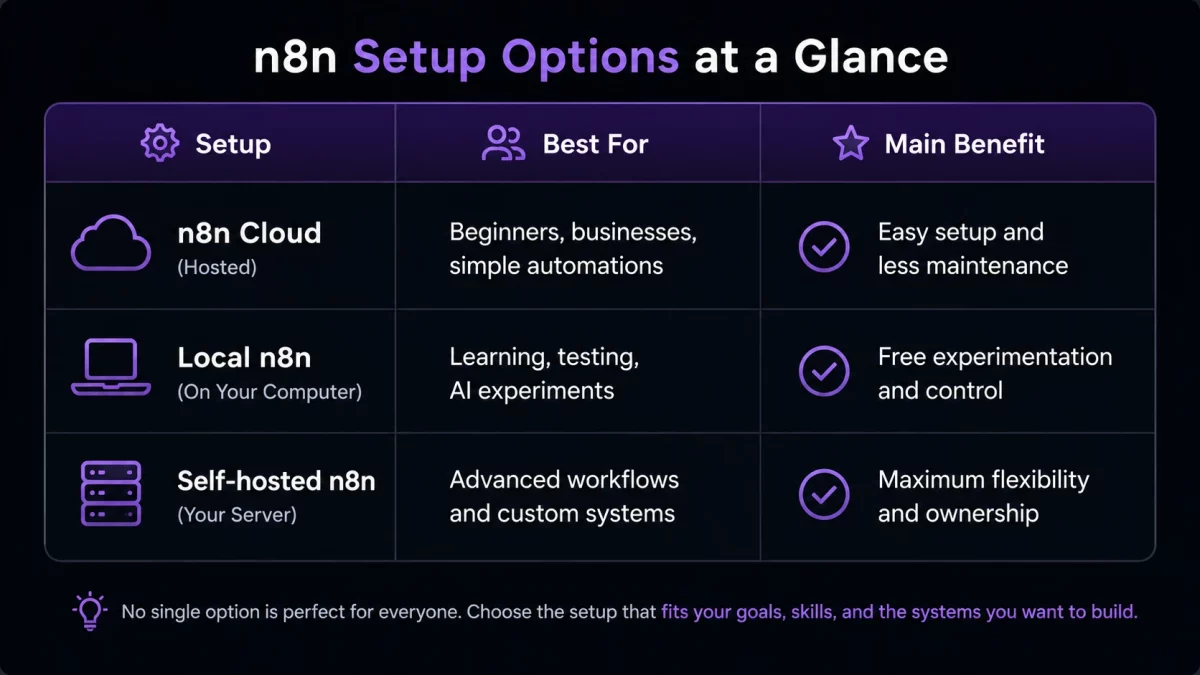
The important thing is not picking the most advanced option.
The important thing is picking the option that helps you actually build workflows.
A simple automation you use every week is more valuable than a complicated system you never finish.
My Recommended n8n Learning Path
If I were starting with n8n again, I would avoid jumping straight into advanced setups.
The learning path I recommend looks something like this:
- Learn the basics of workflows, nodes, and triggers
- Build your first simple automation
- Experiment with AI inside workflows
- Learn how APIs and integrations work
- Explore local AI connections
- Move important workflows to a more permanent setup
This approach keeps the focus where it belongs.
Building useful systems.
It is easy to spend days optimizing your environment before you have actually automated anything.
The workflow matters more than having the perfect setup.
And once you have a setup in place, this beginner n8n workflow tutorial is a good way to test it with a real local AI build.
Using n8n With Local AI
One reason I personally find n8n interesting is how well it fits into the local AI ecosystem.
A local AI model by itself can answer questions.
When you connect that model into workflows, it becomes part of a larger system.
For example, a workflow could:
- Collect information from a source
- Send that information to an AI model
- Process or organize the response
- Save the results somewhere useful
- Notify you when it finishes
That is where tools like n8n, Ollama, AnythingLLM, and retrieval systems start becoming powerful together.
Instead of using AI as a single chat window, you start creating repeatable workflows around it.
If you want to understand how those pieces connect, my Local AI for Beginners guide covers the bigger picture.
Frequently Asked Questions
Should beginners use n8n Cloud or install n8n locally?
Most beginners should choose based on their goal. If you want the easiest setup, n8n Cloud is usually simpler. If you want to experiment, learn, and connect local tools, running n8n locally can be a great option.
Can I run n8n for free?
You can run n8n locally or self-host it without paying for n8n Cloud. However, self-hosting may still involve costs like servers, storage, maintenance, or other services depending on your setup.
Do I need Docker to use n8n?
No. Docker is one popular way to run n8n locally or self-host it, but it is not the only option. Many beginners can start with n8n Cloud before learning Docker or server management.
Can n8n connect to local AI models?
Yes. n8n can connect with local AI tools like Ollama, making it possible to build workflows that use models running on your own hardware.
Final Thoughts
The best n8n setup is not always the most complicated one.
It is the one that helps you start building.
If you want simplicity, n8n Cloud removes the technical setup.
If you want to experiment, a local setup gives you room to learn.
If you need more control, self-hosting gives you flexibility.
The mistake is thinking the setup is the goal.
The goal is creating useful workflows that save time and solve real problems. If you want a simple next project after setup, the beginner first AI workflow guide is a better next step once setup is working.
Start small, learn the system, and improve it over time.
That is where automation becomes valuable.
Stay sharp,
Michael
Creator of GetPrompting.com
Free AI Workflow Kit
Map the workflow before you start wiring nodes.
Define the input, output, review step, and failure condition with the workflow tools inside the combined GetPrompting Starter System.
Move from example to working system
Test the boundary before you automate the whole process.
Inspect a working n8n example first. If the workflow is fragile, customer-facing, or expensive to get wrong, ask Michael to review it.