
Repurposing content should not mean posting the same sentence everywhere.
An X post, a LinkedIn post, and an Instagram carousel do different jobs. They need different pacing, context, and calls to action.
This n8n social post generator workflow helps you turn one source idea into platform-specific drafts without pretending every platform wants the same thing.
The workflow does not publish anything for you. It creates a drafting document you can review, edit, and schedule on your own terms.
This is Workflow 8 in the GetPrompting Free n8n Workflow Library. It teaches platform-aware repurposing with human review still in the loop.
source idea -> platform context -> social drafts -> human edit -> scheduled posts
Quick Copy
Social Repurposing Prompt
Use this manually before wiring the full workflow. If the prompt helps by hand, it is worth automating.
You are turning one source idea into social post drafts.

Source title:
[TITLE]

Source material:
[PASTE SUMMARY OR ARTICLE NOTES]

Source link:
[OPTIONAL LINK]

Platforms:
[X, LINKEDIN, INSTAGRAM, ETC.]

Brand voice:
[VOICE NOTES]

CTA goal:
[WHAT THE POST SHOULD ENCOURAGE]

Return:
- platform-specific drafts
- hooks
- CTA options
- hashtag ideas
- carousel outline
- review notes
What the Social Post Generator Does
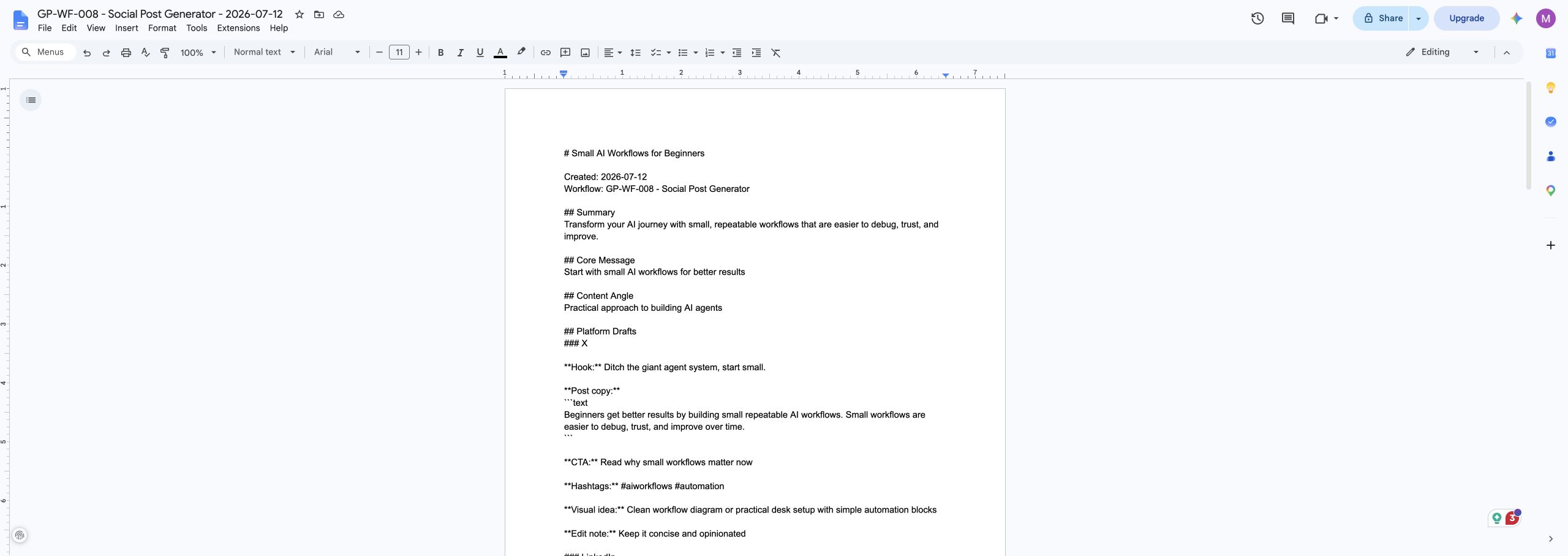
The workflow takes source title, source material, source link, target platforms, audience, brand voice, CTA goal, visual direction, hashtags, and guardrails and turns them into a Google Doc with platform drafts, hooks, CTAs, hashtag ideas, short thread ideas, carousel outline, and review notes.
The important part is not that the workflow is complicated. It is that the workflow creates a real document you can review, edit, and use. That is what separates a practical automation from a fun demo.
Why This Workflow Matters
This workflow teaches platform-aware repurposing. It does not blast the same copy everywhere. It reshapes one source idea for different audiences, formats, and calls to action.
This matters because beginners often try to automate the exciting part first. They jump straight to agents, dashboards, and complicated branching logic before the core pattern is reliable. I like starting smaller. Make one useful thing work. Then make it better.
That approach is slower for about five minutes and faster for everything after that. Once the base workflow is understandable, you can change the model, destination, trigger, or output format without rebuilding from scratch.
What You Need Before You Build It
The version I built uses n8n, Ollama, a local chat model, and Google Docs. You can change those pieces later, but this setup makes the workflow easy to inspect and test.
- n8n running locally, self-hosted, or in n8n Cloud
- Ollama running locally if you want the local AI version
- a local chat model such as
llama3.1:8b, or another model your machine runs reliably - a Google account
- Google Docs credentials connected inside n8n
Download the Free n8n Workflow
I published the clean workflow export on GitHub so you can import it, inspect it, and adapt it to your own setup.
Download the Social Post Generator workflow on GitHub
The repo includes the n8n workflow JSON, screenshots, sample input, sample output, installation notes, customization ideas, and troubleshooting docs.
The public export does not include my private credentials, OAuth tokens, workflow IDs, API keys, or account details. After importing it, you will still need to connect your own Google Docs credential inside n8n.
How This n8n Social Post Generator Workflow Works
Here is the practical flow:
Manual Start -> Set Workflow Inputs -> Build AI Prompt -> Generate With AI -> Review AI Output -> Prepare Google Doc -> Create and Write the Google Doc
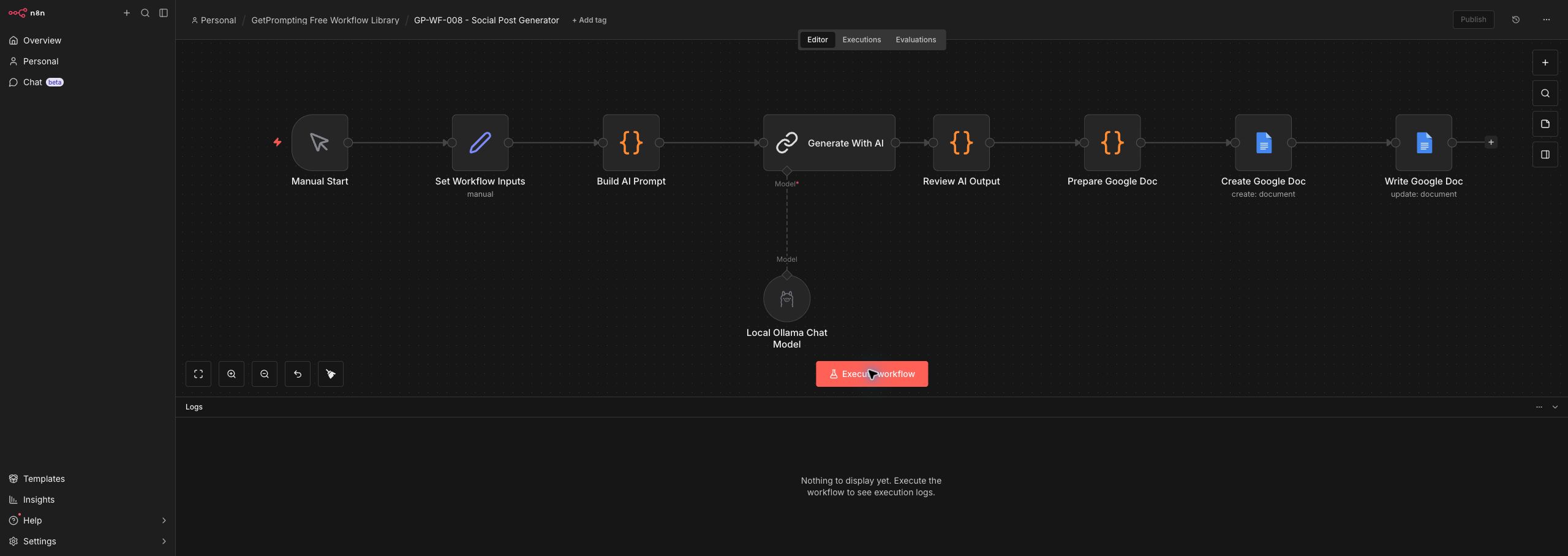
Let us walk through the main pieces.
1. Manual Start
Manual start lets you review drafts before anything gets close to a public platform.
2. Set Workflow Inputs
This node stores source material, target platforms, audience, brand voice, CTA goal, visual direction, and guardrails.
3. Build AI Prompt
The prompt asks for platform-specific drafts instead of one generic post.
4. Generate With AI
The model adapts the source idea into drafts for X, LinkedIn, Instagram, and related formats.
5. Review AI Output
The review step formats drafts and keeps hooks, CTAs, and review notes visible.
6. Prepare Google Doc
This creates a social drafting document you can edit before scheduling.
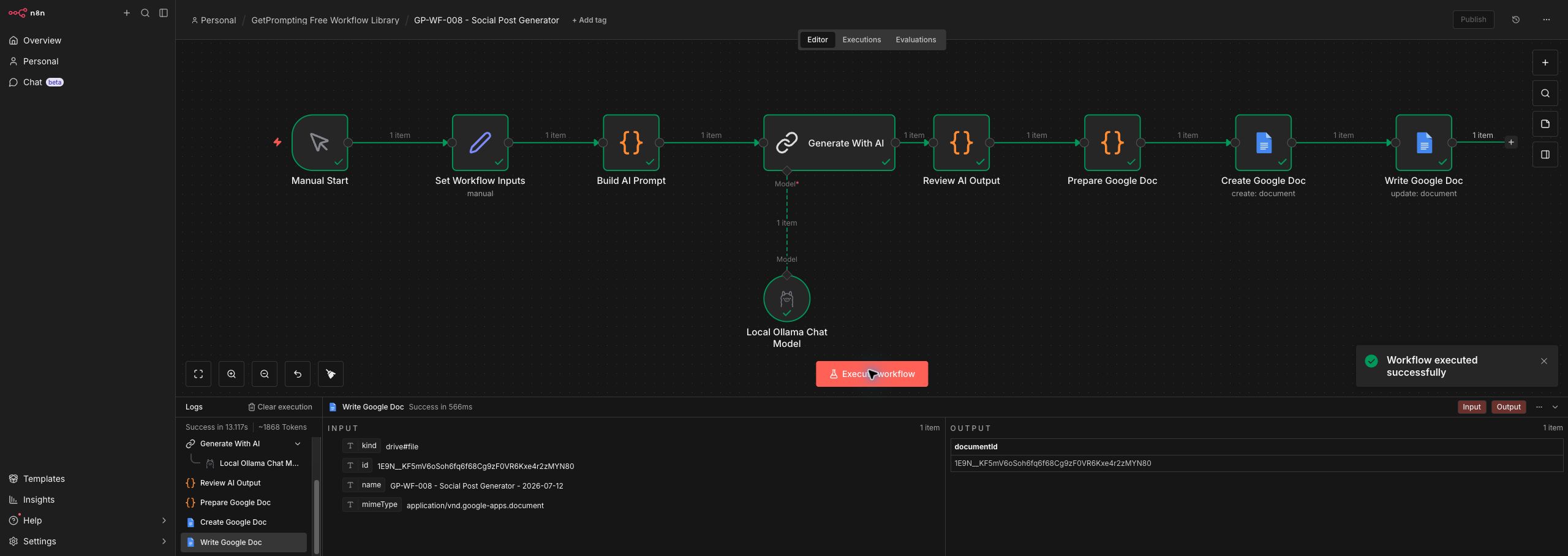
7. Create and Write the Google Doc
The final output becomes a content prep sheet, not an auto-posting system.
The New Concept This Workflow Teaches
This workflow teaches platform-aware repurposing. It does not blast the same copy everywhere. It reshapes one source idea for different audiences, formats, and calls to action.
That concept is the reason this article exists as its own piece instead of being a copy of the previous workflow guide. Each workflow in the library should add a useful idea you can carry into future builds.
Once you understand this pattern, you can reuse it in other workflows. The exact topic changes, but the habit stays the same: define the input, give the model a clear job, review the output, and send the result somewhere useful.
How to Customize This Workflow
The GitHub version is intentionally simple. That is a feature, not a limitation. A simple workflow is easier to understand, modify, and trust.
Change the Inputs
Open the Set Workflow Inputs node and replace the sample values with your own source title, source material, source link, target platforms, audience, brand voice, CTA goal, visual direction, hashtags, and guardrails. If you use this often, you can replace the manual fields with a form, webhook, Google Sheet row, Obsidian note, or Notion database item.
Change the Model
The default version uses a local Ollama model. Smaller models are usually faster and cheaper to experiment with. Larger models may follow complex instructions better, but they can be slower and more memory hungry.
You can also swap the local model for a cloud model through n8n if the workflow needs stronger reasoning. I would still keep the review step, because better models are not the same thing as perfect models.
Change the Output Destination
Google Docs is a friendly first destination because it is easy to read and edit. But you can point the same pattern to Obsidian, Notion, Airtable, Google Sheets, a local Markdown file, a task manager, or a custom dashboard.
Upgrade It Later
- Add a content calendar destination.
- Create separate status fields for idea, draft, approved, and posted.
- Add a screenshot or image-path field.
- Connect approved drafts to a scheduler later.
Common Mistakes to Avoid
Posting identical copy everywhere
Different platforms reward different pacing, formatting, and context.
Letting AI post without review
This workflow should draft. You should still edit and decide what gets published.
Skipping the visual direction
Especially for Instagram, the image or carousel idea matters as much as the caption.
Where This Fits in a Bigger AI Workflow System
The Social Post Generator is small on purpose, but it fits into a larger practical workflow system. It can sit beside the Daily Action Brief Builder, the Search Intent Blog Outline Builder, and the rest of the free n8n workflow library as one reusable tool in a larger process.
That is the real value of building these workflows one at a time. You are not just collecting templates. You are learning patterns: cleanup, planning, triage, structure, review, repurposing, documentation, and knowledge management.
Those patterns compound. A small workflow that solves one clear problem today can become a building block for a much more useful system later.
Where this fits: social repurposing works best when it is part of a repeatable AI workflow, not a one-off prompt that has to be rebuilt every time you publish something new.
Final Thoughts
The Social Post Generator is not impressive because it is massive. It is useful because it gives one messy problem a clear path from input to output.
That is the kind of automation worth learning. It respects the human part of the work while using AI to handle the structure, cleanup, and first-pass organization.
If you want to experiment with it, download the free workflow from GitHub, import it into n8n, run the sample input once, and then replace the sample with something from your own work.
Start small. Make it useful. Then improve one piece at a time.
Stay sharp,
Michael
Creator of GetPrompting.com
Keep Building the Workflow Library
This workflow belongs to the Free n8n Workflow Library, a set of small n8n builds meant to be imported, inspected, and customized one workflow at a time. If you want the previous step in the series, read Research Collector. The next build is Professional Email Builder, which adds another practical pattern without turning the system into one giant automation.
Next step
Ready to adapt this workflow?
Use the guide as a reference build, then decide whether to test it yourself or map the safer version for your own stack.
Open the GitHub repository, inspect the workflow export, and test one change at a time before trusting it with real work.
Open GitHub repoIf this needs to fit your CRM, content process, reporting setup, or local tools, a focused review can surface weak spots before you rebuild.
Ask Michael to review it